
Known Participant
January 8, 2019
Answered

Bridge.exe - No Disk?

  • January 8, 2019
  • 1 reply
  • 973 views

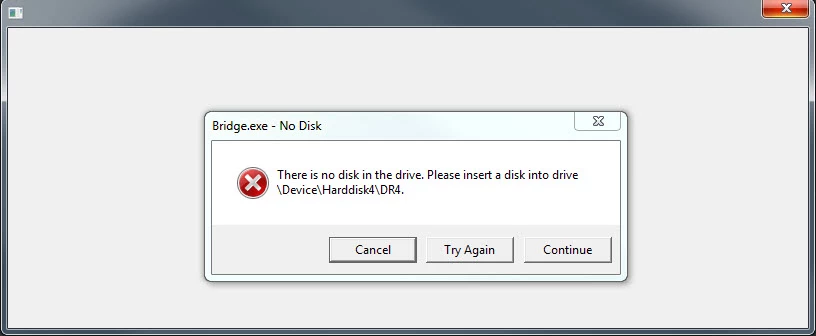
I keep getting an error window pop open whenever I open Bridge.  It says "There is no disk in the drive.  Please insert a disk into drive \Device\Harddisk4\DR4.  I have uninstalled Bridge and re-installed but still can't get it fixed.  HELP

    This topic has been closed for replies.
    Correct answer Abambo

    Discussion successfully moved from Adobe Creative Cloud to Bridge

    Did you have an external disk attached the last time you used bridge?

    Reset Bridge's preferences: Resetting Bridge’s Preferences « Julieanne Kost's Blog

    1 reply

    Abambo
    Community Expert
    AbamboCommunity ExpertCorrect answer
    Community Expert
    January 8, 2019

    Discussion successfully moved from Adobe Creative Cloud to Bridge

    Did you have an external disk attached the last time you used bridge?

    Reset Bridge's preferences: Resetting Bridge’s Preferences « Julieanne Kost's Blog

    ABAMBO | Hard- and Software Engineer | Photographer
    xodin49Author
    Known Participant
    January 8, 2019

    Thanks Abambo.  Yes I did have external disk attached.  I operate off external drives.  I followed the reset instructions and it appears to be working.

    Abambo
    Community Expert
    Community Expert
    January 8, 2019

    You're welcome.

    ABAMBO | Hard- and Software Engineer | Photographer