
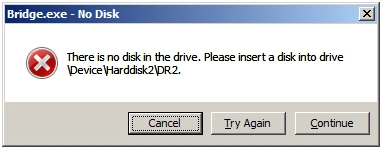
Bridge.exe - No Disk
I am getting this dialog box popup every time I open Bridge. I need to click any of the buttons several times before Bridge is usable.
1 - I do not have any other Disks open (I do have a second internal hard drive for data)
2 - I have external hard drives for archives, but seldom open an image in Bridge from them.
3 - Julianne Moore's answer (from the answer to another user's previous identical question) does not help.
"When launching Bridge, Control-Alt + Shift to choose “Reset Preferences”, Purge Entire Thumbnail Cache”, and/or Reset Standard Workspaces”.
Cntl-Alt + Shift 'while' launching Bridge does nothing.
Cntl-Alt + Shift 'after' launching Bridge does nothing.
In Bridge's preferences, there are no options to "Purge Entire Thumbnail Cache", "Reset Preferences", or "Reset Standard Workspaces".
Adobe Bridge CC
Version: 9.0.2.219 x64


 AdChoices