
Harribone100
Participating Frequently
February 11, 2021
Question

Bridge freezing my Mac

  • February 11, 2021
  • 2 replies
  • 448 views

Hi

Yesterday I decided to update to Bridge 2021 (from 2019), but it now keeps freezing my machine. I've managed to hone it down to the texture slider, every time I touch this the spinny wheel comes up or my screen freezes... (it's even just restarted my machine automatically) or it freezes like so:
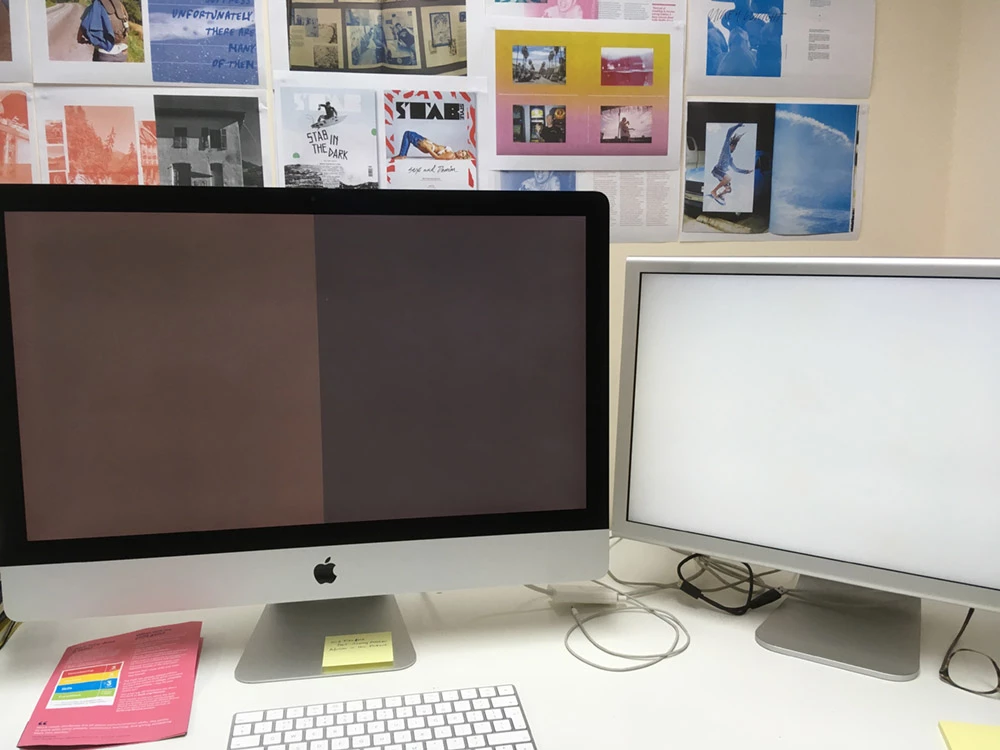


I tried uninstalling and going back to the 2020 version but the same thing happens. Ideally, I'd like to go back to the 2019 version which worked fine (if it ain't broke...). Does anyone please have any idea why it might be doing this and is it possible to back to the 2019 version?


I'm on an iMac (Retina 5K, 27-inch, Late 2015) running Mojave 10.14.6


Many thanks

This topic has been closed for replies.

2 replies

gary_sc
Community Expert
Community Expert
February 11, 2021

Hi Harribone,


I have pretty much the same system as you albeit no 2nd monitor and I'm now on Catalina but those shouldn't make any difference.


There is no texture slider in Bridge, nor is there any image inhancement capabilities in Bridge. There is in ACR (Adobe Camera Raw) which is a Plugin accessed via Bridge or Photoshop. 


Now that that's clear, my guess is that there's something wrong with your ACR instillation. What I'd like you to try is to quit both PS and Bridge, then download a new copy of ACR (https://helpx.adobe.com/mt/camera-raw/kb/camera-raw-plug-in-installer.ug.html)


Then, after the install is complete, restart Bridge and PS.


Let me know if that fixes it. If not there are more things to try.

Harribone100
Participating Frequently
February 12, 2021

Hi Gary


Thanks for getting back to me, much appreciated. What a fool I am!... of course it's Camera Raw, not Bridge that I'm talking about. However, I followed your instructions and installed the latest Camera Raw but it's still happening, as soon as I click on the texture slider I get the spinny wheel and my only option is to do a hard restart hitting the button on the back of the machine, I don't get a crash report, I can't force quit Bridge, it just freezes everything.


If I open an image in Camera RAW through Photoshop it works fine but I really need the capabilities that Bridge enables on a day to day basis. I have to process a lot of images and I'm lost without it. I also need to be able to Sync all my colours across all Adobe apps which I do through Bridge.


Just to recap, everything was running fine, I had a bit of free time on my hands so I decided to do a long-overdue software update, starting with my operating system (now running Mojave 10.14.6), I might continue on to Big Sur but one thing at a time! I then updated Photoshop, Indesign, Illustrator and Bridge and that's when the freezes starting happening.


Fingers crossed one of your other fixes might work.


Harribone100
Participating Frequently
February 12, 2021

I think I might have worked it out. It was happening on most of my image folders except for one, weirdly. Anyway, I decided to turn off GPU in Camera Raw preferences and it's fixed it (so far!) so it was a video driver problem. Do you think If I update to Big Sur or Catalina that might fix it permanently, rather than having to turn GPU off?


Harribone100
Participating Frequently
February 11, 2021

I forgot to say... it does it with any chosen image from any folder.