joziG
Known Participant
January 11, 2023
Answered

Bridge GPU problem at start up then crashes

  • January 11, 2023
  • 2 replies
  • 957 views

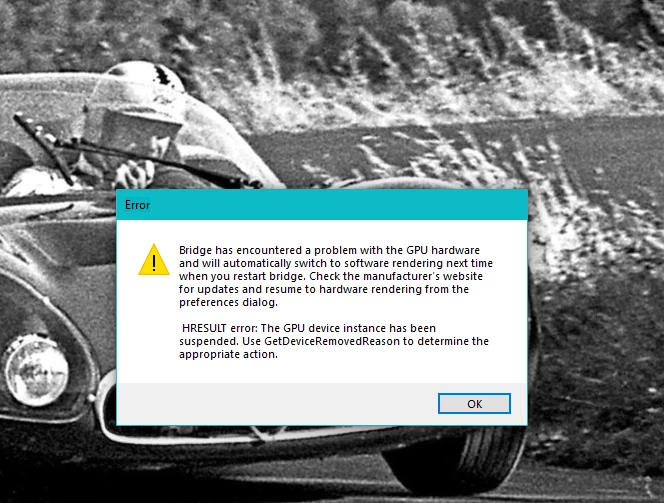
Hi, Bridge worked perfectly until this morning. I now get an error message (see below) then it simply closes. That means I cannot use Bridge any longer!


I do want to use Bridge!


Any help appreciated. Thank you


This topic has been closed for replies.
Correct answer gary_sc

Thanks again for your information. Yes, I am subscribed to the full plan.


The current scenario happened after installing 13.1. I am quite sure there were no problems with 13.0. I am going to install 13.0 shortly and see what happens. I am using 12.4 at the moment which works the way that Bridge always did. Would really be such a pity if I couldn't update anymore.


By the way, I did not downgrade Photoshop nor Photoshop beta and all works fine.


Thanks again. I shall let you know how things are playing out.


By the way, I am on DirectX 12


Because of the number of bugs that have plagued version 13, I'd encourage you to get the latest release for Bridge which can be found in the "ACC window" under the Beta tag. While there are still a few issues, it is, by far, the best current version for this release.


2 replies

joziG
joziGAuthor
Known Participant
March 16, 2023

Good day, in January I posted the above post. Now we are in March and nobody seems to have the same or similar problem. Surely, I simply cannot be the only person with this problem!


DOES NOBODY HAVE ANY ADVICE FOR ME?


I really would like to be able to work with Bridge as I have for a great many years.


I have done the usual things, uninstall reinstall, makes no difference. Possibly a problem due to my Windows 10. I always do the latest updates, check for viruses, malware, ransomware etc etc


I am at my wits end

Erik Bloodaxe
Legend
March 16, 2023

Which version of Bridge?

What is your GPU?

Have you tried to update the graphics driver software by visiting the manufacturer's website? Don't rely on Windows to keep this up to date for you!

Does your system meet the minimum system requirements for running Bridge?

https://helpx.adobe.com/uk/bridge/system-requirements.html


joziG
joziGAuthor
Known Participant
March 18, 2023

Thank you very much for your reply! Much appreciated.


I'd like to attach a list of components etc, which should make most things clear,


  • As you can see, my PC does not meet all the requirements for the latest version of Bridge. (I always update timely)
  • CPU out of date
  • Old GPU to which there are no more updates are available at Intel


The rest seems all fine.


So, the obvious solution is - get a new PC. Fine. Exactly that constitutes a big problem for me. As an old-age pensioner I am on a very tight budget, which simply does not allow for expenses of that caliber.


I have been using Adobe products almost from inception. I am a graphic designer and loved all the programmes. Bridge was always a mainstay for me.


Can you perhaps think of a possible solution for me?


Thank you


P.S. I guess the next Photoshop will put me in a similar situation.


Participant
January 11, 2023

I have had the same problem. If I just ignore the error message it seems to work. As soon as you click on the error message Bridge closes. The only thing that does not work in my case is te full screen preview, nor bay pushing spacebar neither through the menu. So I have come back to previous version of Bridge that works quite well, but frequent and of random duration "Not respond" (this is my translation from SpanishI as I do not know how is the message in English).

I expect some solution to the problem, not necessarily changing my PC or at least GPU.