


Royhessey
Inspiring
February 25, 2019
Question

Bridge has encountered a problem with display driver.

  • February 25, 2019
  • 8 replies
  • 4304 views

I have the current version of Bridge installed on my desktop. (  9.0.2.219 X64 ) and have the latest drivers for my display adapter. ( NVIDIA GeForce GTX 1070 ).

I am getting the following message : ( see photo )
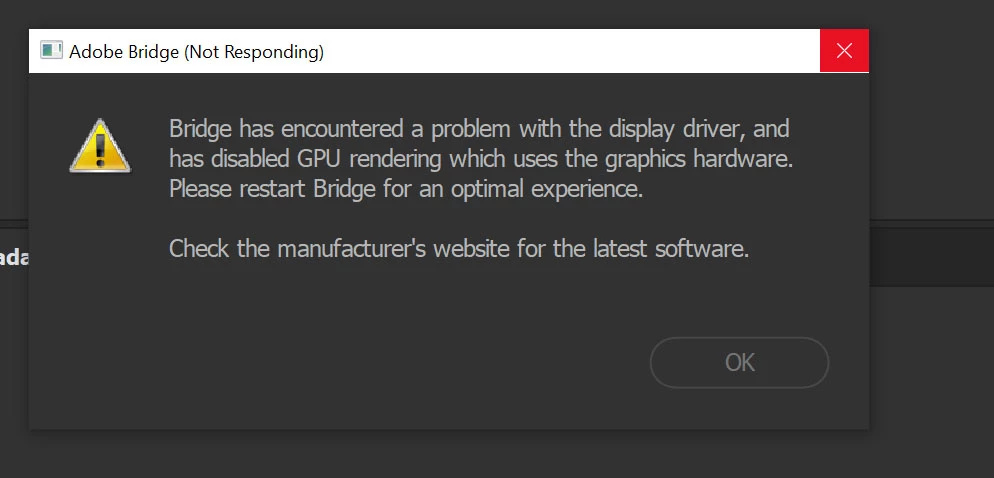
It only happens on boot up. It also happened before I updated the Nvidia driver.

Any suggestions ?

    8 replies

    Participant
    November 27, 2022

    Does Adobe contribute to these questions or is it just presupposed answer from users?


    gary_sc
    Community Expert
    Community Expert
    November 27, 2022

    @James25291943wq0x If you look at the 2nd comment from the top, you'll note that the person is identified as an Adobe employee.


    Does that help answer your question?


    Participant
    September 21, 2019

    I have no more issue since I don't have the Bridge as my default program to open pictures. Since I start Bridge first (manually) it all works great. I guess you can't use it like the default one.


    Good luck

    Participant
    May 2, 2019

    I encountered this issue in Photoshop, but Bridge was acting funny too, it just didn't show me the error. I could barely do anything in before Photoshop ground to a halt because it seemed to be relying on my PC's RAM, not the GPU's RAM. I downloaded the latest NVIDIA graphics drivers (GeForce GTX750 Ti) after realising my drivers were way out of date, and now things are running smoothly again. I guess Adobe rolled out some updates that weren't supported by my old drivers.

    Did you get the drivers directly from NVIDIA as opposed to Windows Update or similar? Sometimes Windows Update doesn't deliver the latest drivers.

    Edit: I'm running a custom built PC with Windows 10 Pro v1809.

    Jonny Shaw
    Known Participant
    April 24, 2019

    Have had this same issue now for months.  Running the latest nvidia drivers on a GTX980ti Bridge CC 2019 works fine if I open it independently, but if I right click a folder and browse with bridge, this error occurs every single time.

    Right clicking from explorer is far more useful on occasions, and this is rendering Bridge next to useless for me at the moment

    Participant
    March 25, 2019

    I think I got it.

    For the laptop users, try to set in NVIDIA control panel, the 3D Settings > Manage 3D Settings > Program Settings > Bridge to NVIDIA (not auto)

    It looks great for me.

    For the PC, it was working great when I was not rendering and blocking all VRAM of the graphic card. I think Bridge is trying to reserve some VRAM and since they are not free and reserved by other apps, this will cause the problem.

    I hope it helps.

    Good luck !

    April 22, 2019

    MBADICI​ Which setting do you mean? What is »Bridge to NVIDIA«?

    Thank you!

    Carlos

    Participant
    April 23, 2019

    Hello Carlos,

    that is the one.

    If you are on a laptop and you have 2 cards (Intel + NVIDIA) then I did "Hinzufügen" and then I choose NVIDIA by default (not auto).

    Then it was working OK.

    At start up, you might have some problems due to driver loading (probably). But after that I never had any issues. I hope it helps.

    I chose NVIDIA, not default.

    Participant
    March 25, 2019

    Same with AMD FirePro W7100, latest Bridge, latest GPU driver, Win10 with 1809.

    Participant
    March 23, 2019

    I have the same problems on laptop with Nvidia GTX 1060 Max Q and on PC with Nvidia GTX 1080 Ti. I have all updates for the drivers from NVIDIA and got no clue what the problem is with all adobe products.

    At work I got another NVIDA Quadro and got also errors like that...

    Adobe Employee
    February 26, 2019

    Hi,

    This dialog comes up when it detects that there is some problem with GPU.

    Request you to reinstall GPU updates and check again.

    Regards,

    Abhishek Seth

    jbm007
    Community Expert
    Community Expert
    February 26, 2019

    Agree

    If you still are having issues reinstall Bridge or try a older GPU driver that was working.

    NetPixel
    Inspiring
    July 27, 2019

    Regarding the replies targeting the updates or debugging all kind of settings...

    99% of the users will use the latest drivers. But anyway, regardless of the driver version, the software code must handle driver version changes. At least at the level of error messages. Example: "At least xy driver version x.y is needed". Users aren't software/update specialists.

    I receive this error continuously since one year. Since then countless NVIDIA drivers have been installed and several Adobe Bridge version were updated.