RacingTog
Participating Frequently
December 4, 2016
Answered

Bridge is not responding since graphics card update

  • December 4, 2016
  • 3 replies
  • 950 views

Hi, I have just updated to a new graphics card MSI GeForce GTX 1050 Ti on my Win 10 64bit PC. But now Bridge just doesn't respond for ages every time I try to do something. I have uninstalled Bridge CC and then re-installed it but it hasn't solved the issue.

Can someone help please driving me crazy!

This topic has been closed for replies.
Correct answer Deepak_Gupta1

Hi RacingTog,

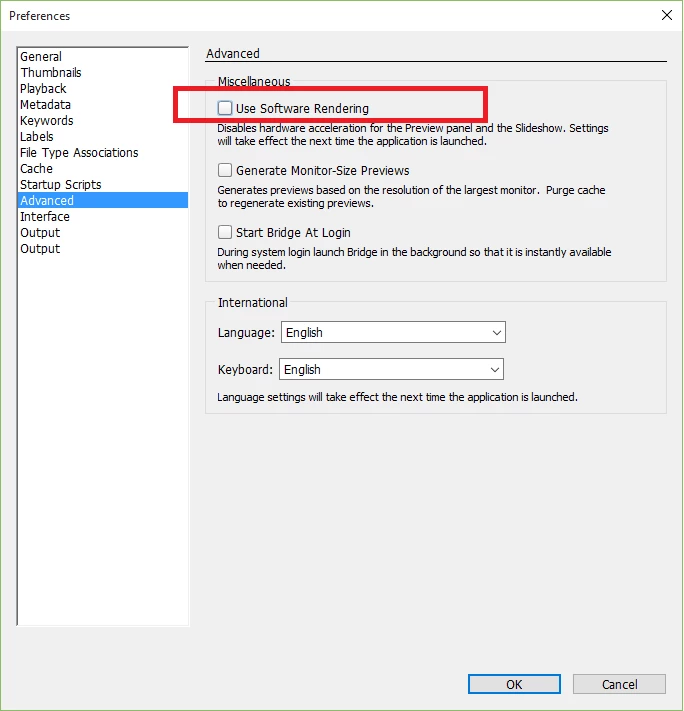
I suspect that Software rendering preference is turned-on. Can you please check the option "Use Software Rendering" under preferences (as shown in screenshot below), this should be off.

Thanks,

Deepak Gupta

3 replies

Deepak_Gupta1
Deepak_Gupta1Correct answer
Participating Frequently
January 18, 2017

Hi RacingTog,

I suspect that Software rendering preference is turned-on. Can you please check the option "Use Software Rendering" under preferences (as shown in screenshot below), this should be off.

Thanks,

Deepak Gupta

RacingTog
RacingTogAuthor
Participating Frequently
December 18, 2016

Solution?

OK, so here’s what I did.
I uninstalled Bridge 2017. I installed Bridge 2015. This didn’t work any better than 2017. !sad smiley

I ran 2015 as Administrator by right clicking the Bridge2015.exe file. (C:\Program Files\Adobe\Adobe Bridge CC 2015). I than tested the Bridge 2015 app for Windows compatibility issues (there is an option on right clicking the Bridge2015.exe file to test for compatibility) This then tested the app in Win 8 mode. When I tested the app it didn’t work.sad smiley

I then told the Windows compatibility that it didn’t work (it stays open while you test the app) and it asked what version it had worked in previously, so I said Win 7. I then tested the app in Win 7 compatibility mode (there is a test button in the Win Compatibility checker) – and it worked!smoking smiley

I then re-installed Bridge 2017 and, right clicked the Bridge2017.exe file (C:\Program Files\Adobe\Adobe Bridge CC 2017) and selected “Run as Administrator” and it too now works!the finger smiley

Wow! What can I say? (Chorus of “Only Bloody Adobe!”)

RacingTog
RacingTogAuthor
Participating Frequently
December 10, 2016

Ok, So, I had my IT engineer come round today and completely updated my PC and home network.  Everything is working great now and even Bridge is working much faster, but it still goes into “not responding” briefly and lags slightly.

Good news is that Photoshop appears to be showing my images in decent colours again, at least they appear to match how they appear in Bridge.

I have no idea what settings I am supposed to set in Bridge and Photoshop so that the symbol in PS shows that the colour settings are linked together.

Can any body please show me how to set up PS and Bridge so that they use the same settings please?

Does anyone know how I can get Bridge to work without lagging again? I don’t know why it’s doing this?

Thanks,

RacingTog
RacingTogAuthor
Participating Frequently
December 17, 2016

Can someone from Adobe please tell me why they have these forums? Nobody has bothered to respond to my post - so what IS the point?

PECourtejoie
Community Expert
Community Expert
December 19, 2016

Racing tog, hello, sorry no one could help you on that matter. The Bridge forum has less users than the Photoshop one.

Also, please try to give as much relevant information, for instance, the content of the folder, the version of your graphic card driver, the exact versions of Bridge installed (the .version) as it might help pinpoint the problems.