
Participant
September 26, 2018
Question

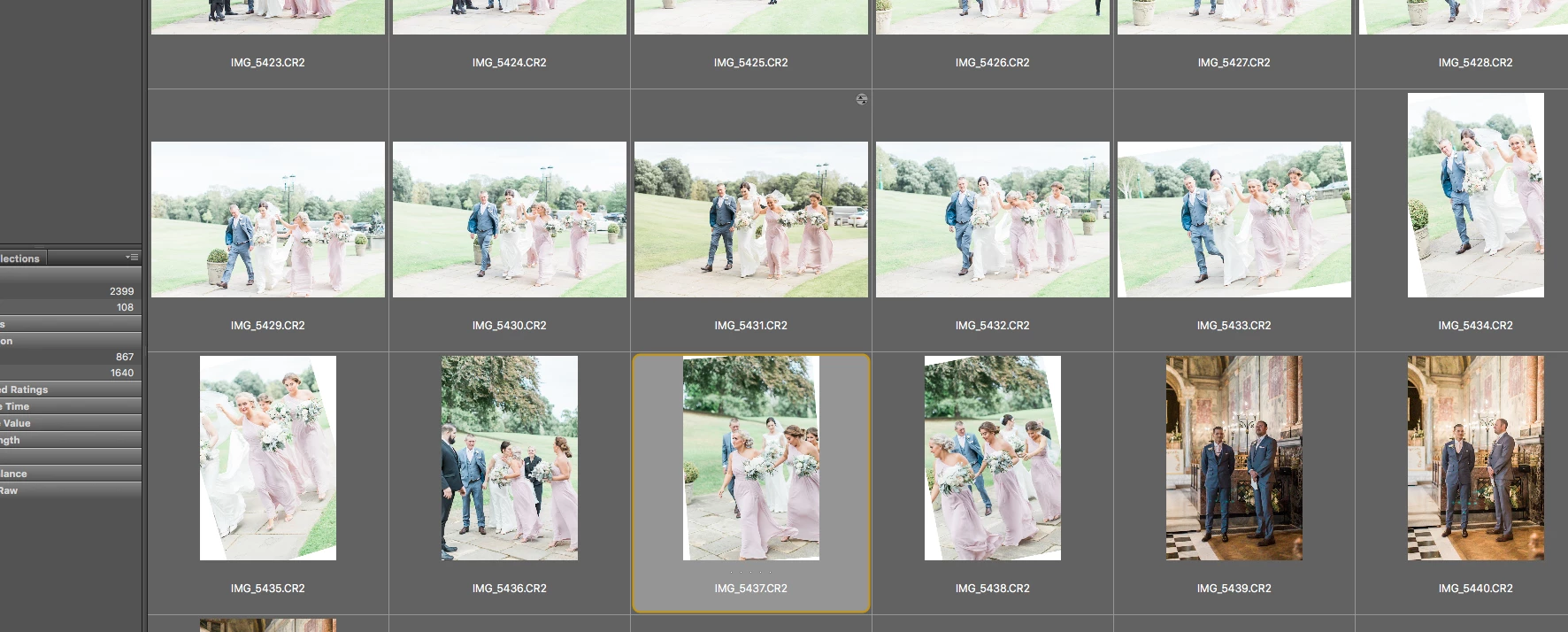
Bridge is rotating the odd image by 15 degrees, causing cropping into the photo.

  • September 26, 2018
  • 3 replies
  • 388 views

I've just noticed this - the images were fine when I uploaded them and there was no odd rotation.  Not sure what has happened?  but I'm losing part of the image and can't work out how to get it back.  I'm using Adobe Bridge CC 2018 - Version 8.1.0.383
This topic has been closed for replies.

3 replies

Community Manager
October 16, 2018

Hi All,

We have released a new version of Adobe Bridge (CC 2019) on 15th October 2018. The new version build number is 9.0.0.204. This version is available to install via Adobe Creative Cloud application. Please try with the 9.0.0.204 Bridge and Camera Raw 11.0

Please let us know if the issue got resolved.

Also please check following link to know about all new features in Adobe Bridge CC 2019 - https://helpx.adobe.com/bridge/using/whats-new.html

You may need to update the Creative Cloud application and restart your computer to see the updated installer.

Thanks,

Avinash

Legend
September 27, 2018

I see there are RAW files. Do you have rotation set in a Camera RAW preset?

Participant
September 26, 2018

to anyone with this problem I have now resolved the issue.  Right click on any of the problem images and purge the cache

Participant
September 26, 2018

So purging the cache was working for a few images but not now?!?!  Still need help