

Bridge Issue Adding Multiple Keywords
I am attempting to add multiple keywords to images in Bridge via the 'Keywords' panel. I'm not attempting to 'batch' apply the keywords to multiple keywords...simply adding multiple keywords to a single image.
The issue I'm experiencing is the inability to add more than 2 keywords one right after the other. As soon as I add 2, Bridge needs to 'take a break', I have no other idea how to describe it. It just becomes completely dysfunctional and I have no choice but to wait for it to regain functionality.....typically somewhere in the 15-20 second range.
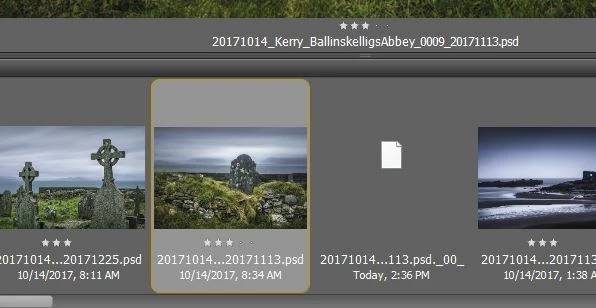
In addition to the above, it's common to have some sort of 'temp file' appear in the thumbnails strip at the bottom of my workspace. See the attached screen cap. That 'white' colored file is not there when I begin to add keywords. It only appears shortly after the 15 second 'break' starts, and eventually disappears. Based on the behavior, I'm guessing the appearance of that 'temp file' and the fact that Bridge seems to retain keywords I've entered means Bridge is busy doing *something*, but it's sure taking its good old sweet time in completing whatever operation involved.
FWIW...I have tried compacting the Bridge cache, and when that had no impact on this behavior, I also completely purged the cache.
FWIW #2....I am running Bridge v8.1.0.383 X64.
Any suggestions anyone could provide would be greatly appreciated. The issue has only started in the last couple months. Other than applying updates when the CC app tells me one's available, I know of nothing else I've done that would be involved....neither in Bridge, nor on the pc in general (I have applied Windows 10 updates when available, but nothing else has changed.


 AdChoices