Participant
May 8, 2017
Question

Bridge Keyword Speration

  • May 8, 2017
  • 2 replies
  • 454 views

Hello all!

Can anyone provide guidance on how can I set Bridge to save commas in keywords metadata and not convert them to semicolons?
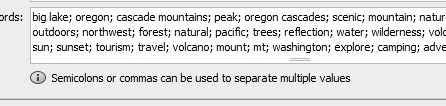
Thanks!

This topic has been closed for replies.

2 replies

SuperMerlin
Inspiring
May 9, 2017

You can't, you can use commas when entering keywords but these will be changed to semicolons.

Stephen Marsh
Community Expert
Community Expert
May 9, 2017

I entered the keywords in Bridge’s Metadata panel, IPTC Core window as:

Keyword 1, Keyword 2; Keyword 3

However they were all automatically set to use semicolons ; after being applied…

File > File Info > Raw Data lists the data as expected:

<dc:subject>

            <rdf:Bag>

               <rdf:li>Keyword 1</rdf:li>

               <rdf:li>Keyword 2</rdf:li>

               <rdf:li>Keyword 3</rdf:li>

            </rdf:Bag>

</dc:subject>

Looking at the metadata with ExifTool, they are all listed as using commas , such as: Keyword 1, Keyword 2, Keyword 3

So, it is probably just a display thing – I don’t know of any way to change this.