This topic has been closed for replies.
Correct answer gary_sc

Hi Klaus,


Please check something for me: Go into your preferences and see if the following is checked or unchecked:
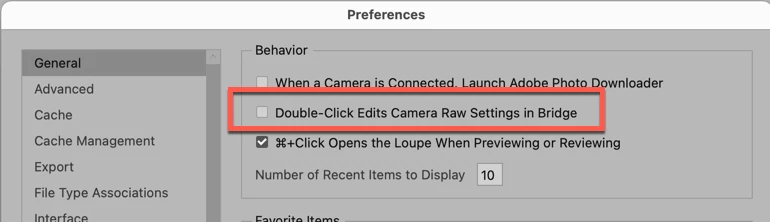
If it's checked, uncheck it or if it's unchecked, check it.


Then try to do what you are trying to do.


Then, (either way), please rebuild Bridge's Preferences:


Quit Bridge (if running). Just before clicking on Bridge in the Dock or double-clicking the application, for the Mac, press Command-Option-Shift. For PCs, press Control-Alt -Shift. Then open Bridge BUT KEEP your fingers on those keys until you see a window pop up. From the window, choose “Reset Preferences," "Entire Thumbnail Cache”, and/or "Reset Standard Workspaces.” In your case, choose "Reset Preferences."


Let me know what happens.

1 reply

gary_sc
Community Expert
gary_scCommunity ExpertCorrect answer
Community Expert
February 13, 2022

Hi Klaus,


Please check something for me: Go into your preferences and see if the following is checked or unchecked:

If it's checked, uncheck it or if it's unchecked, check it.


Then try to do what you are trying to do.


Then, (either way), please rebuild Bridge's Preferences:


Quit Bridge (if running). Just before clicking on Bridge in the Dock or double-clicking the application, for the Mac, press Command-Option-Shift. For PCs, press Control-Alt -Shift. Then open Bridge BUT KEEP your fingers on those keys until you see a window pop up. From the window, choose “Reset Preferences," "Entire Thumbnail Cache”, and/or "Reset Standard Workspaces.” In your case, choose "Reset Preferences."


Let me know what happens.

Participant
February 14, 2022

Hi,

I cannot open Carmera Raw from Bridge. I do not receive an error, Where I used to have the option of Open With Camera Raw is not there when I right click. It is also greyed out in the file dropdown.  It will open from the filters option within Photoshop. This only occured today when an update occured. I was using it this morning then it was not available. I went so far as to not only follow your advice above, I have completely uninstalled every bit of Adobe and reinstalled.  


It seems I am not alone. Any assistance would be appreciated. 

gary_sc
Community Expert
Community Expert
February 14, 2022

What is the image format of these images? Raw, jpg, tif??
