Participant
May 8, 2023
Answered

Bridge - shared keyword list that can be used to tag and search

  • May 8, 2023
  • 1 reply
  • 1459 views

I work with our comms team at work and we're working on a new image library.


I want to create a centralised list of keywords that can be applied to individual and groups of images, and then used to filter/search the images as well. But I also want that central list of keywords to be shared across a couple of users.


For example - we have four enterprises in our organisation, one of which is child care with numerous sites. So I'd want the enterprise as a keyword, then the individual site, then maybe 'boy', 'girl,' educator', 'outdoors', etc. But if I selected just 'educator' I'd want to see all the educators across the whole library.


TL&DR - can I create a central list of keywords that can be shared among numerous users to add and search with.

Correct answer gregreser

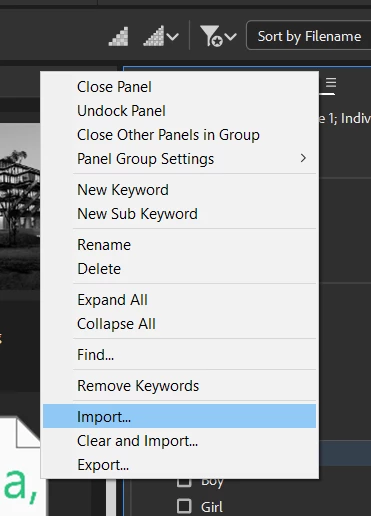
You would need a networked DAM to have a centrally managed and shared keyword list. Bridge can't do exactly what you need, but it will allow you to create a keyword list that can be imported to each user's installation of Bridge. The main problem then is managing these shared lists. Whenever the list is edited, it as to be imported to each user's installation of Bridge. Still, it's better than no list at all (maybe).


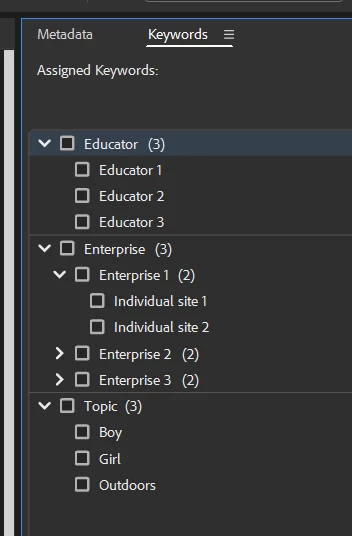
The keyword list is a plain text (.txt) file and it can use hierarchical keywords which would allow you to group all educators under one dropdown. There are limitations and quirks to the keyword panel, but you might be able to work around them.


For example:

organization_keywords.txt

Enterprise
	Enterprise 1
		Individual site 1
		Individual site 2
	Enterprise 2
		Individual site 1
		Individual site 2
	Enterprise 3
		Individual site 1
		Individual site 2
Educator
	Educator 1
	Educator 2
	Educator 3
Topic
	Boy
	Girl
	Outdoors


Bridge Keyword panel:


Click the Keyword panel hamburger menu to access the import option


1 reply

gregreser
gregreserCorrect answer
Legend
May 8, 2023

You would need a networked DAM to have a centrally managed and shared keyword list. Bridge can't do exactly what you need, but it will allow you to create a keyword list that can be imported to each user's installation of Bridge. The main problem then is managing these shared lists. Whenever the list is edited, it as to be imported to each user's installation of Bridge. Still, it's better than no list at all (maybe).


The keyword list is a plain text (.txt) file and it can use hierarchical keywords which would allow you to group all educators under one dropdown. There are limitations and quirks to the keyword panel, but you might be able to work around them.


For example:

organization_keywords.txt

Enterprise
	Enterprise 1
		Individual site 1
		Individual site 2
	Enterprise 2
		Individual site 1
		Individual site 2
	Enterprise 3
		Individual site 1
		Individual site 2
Educator
	Educator 1
	Educator 2
	Educator 3
Topic
	Boy
	Girl
	Outdoors


Bridge Keyword panel:


Click the Keyword panel hamburger menu to access the import option


Participant
May 15, 2023

@gregreser you legend! That would definitely do the trick. It's a small team - 3 or 4 people - so importing the keyword list isn't really a drama.


Thanks so much!

gregreser
Legend
May 16, 2023

Great, I'm glad that solution will work for you. Please mark my answer as correct to help my legend status!