



rodrigounda
Known Participant
August 19, 2023
Question

Bridge used to rock

  • August 19, 2023
  • 1 reply
  • 282 views

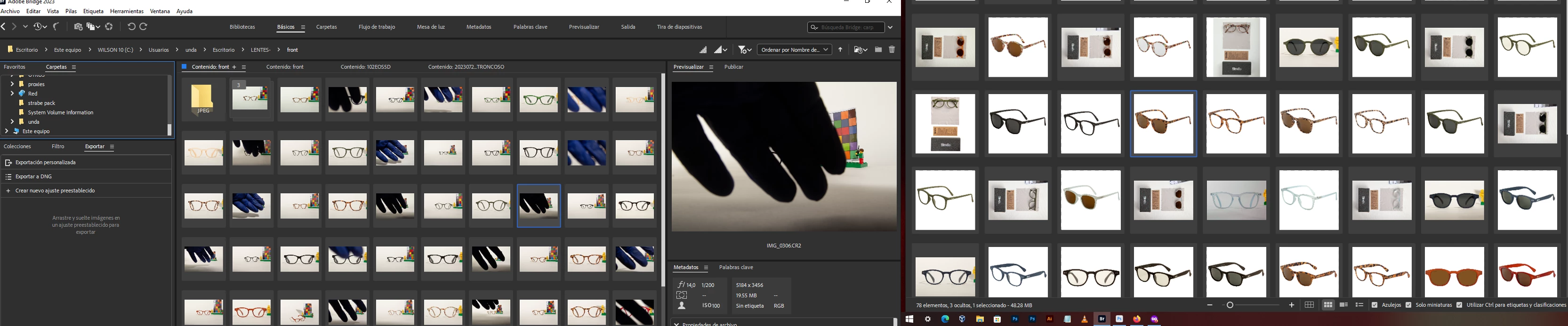
Now I need to compare folders. jump from one folder to other in a screen.
and to folder to folder on second screen.
But even I was able to "dedock" a content tab to browse files, it suck that they share the preview and folder pane. That makes so painful to work. basically I need to compare files.
Adobe team could learn something from old software "ACEDESEE", that had a visual replacement file pop up.


I loved when you could make 2 brodge windows and work EASILY

;(


This topic has been closed for replies.

1 reply

gary_sc
Community Expert
Community Expert
August 20, 2023

Do you realize that the new beta of Bridge (2014) does allow two screens?


However, to keep you ahead of issues, you should also download the beta of the new PS that has a lot of Gen-art capabilities, and you'll need to download the newer ACR. HOWEVER #2: when you install the new PS beta, there is a bug that will remove all the PS Tools in Bridge. To fix this, AFTER installing the PS, you'll need to uninstall the previous version of PS and then reinstall it again. (Yes, it sounds strange, but it works.)


If you want to avoid all that hassle, you can also do what I do (even now with multiple window capability) is to have one Content Panel on the left and one on the right, and the Preview Panel in the middle. Yes, this is intended for one monitor operation, but I have found this to be the fastest and most efficient way to compare two folders of images.