
dont61379783
Participant
November 2, 2021
Answered

Bridge v12 and thumbnails

  • November 2, 2021
  • 2 replies
  • 780 views

I downloaded v12 of Bridge and now I am finding that all of the thumbnails are not showing as well as the metadata.  Has anyone else had this problem?  The previous of Bridge worked fine so can someone tell me how to delete v12 and re-install the prior version?
Correct answer gary_sc

Hi Dont,


Before you give up on v. 12, be aware that Bridge, ACR, and PS all work together with versions so you will have compatibility issues if you backtrack on just one application.


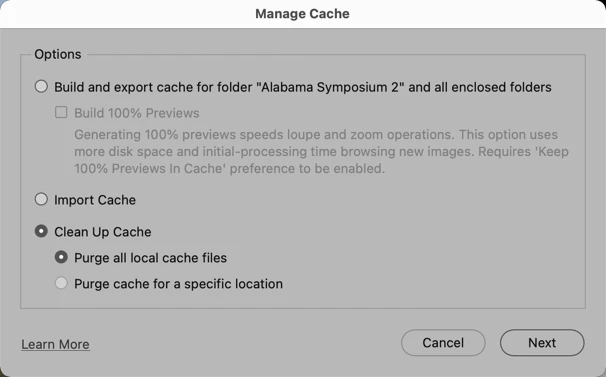
But before you even try that please try refreshing the cache for the folder you're looking at. Go to Tools (menu) -> Cache -> Manage Cache. And match this screenshot. Let us know what happens.

2 replies

dont61379783
Participant
November 4, 2021

That seems to have worked.  I also plugged the card reader directly in to a USB port on the pc.  Before I had it plugged in to a hub.

Thanks for your help!

Inspiring
November 5, 2021

The solution fixed the problem for me.


Thnaks!

Inspiring
November 5, 2021

Sorry but that answer didn't work. The problem has showed up again. This time I had a whole bunch of photo I dumped from the camers to a directory I use to add keywords and sort through the ones I don't want to keep. The new lot all showed up with blank displays for XMP files. If I select a series of photos (can't use shift+click, each has to be chosen individually) and open in CR. I select the ones I want to delete then click Done. Back in Bridge the display is jumping around all over the place. It seems to be refreshing the whole display. If you are working with a lot of pictures the is a major problem and it takes a long time to do the refresh.

gary_sc
Community Expert
gary_scCommunity ExpertCorrect answer
Community Expert
November 2, 2021

Hi Dont,


Before you give up on v. 12, be aware that Bridge, ACR, and PS all work together with versions so you will have compatibility issues if you backtrack on just one application.


But before you even try that please try refreshing the cache for the folder you're looking at. Go to Tools (menu) -> Cache -> Manage Cache. And match this screenshot. Let us know what happens.

Known Participant
November 4, 2021

Doing as suggested above results (for me at least) in the appearance of an xmp file for each thumbnail.  I don't know what is going on with Bridge - its not getting the resource it deserves.  That's how it seems to me anyway.