
Question
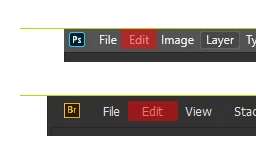
Bug: Bridge's main menu hit boxes don't go to the edge of the screen (v10)
When Bridge is maximized, if you hover over any of the main menu items (File, Edit, View, etc.) you can't click them if your pointer is positioned at the top of your screen, like you can with other Adobe programs, as well as the built-in Windows minimize, maximize, and close buttons. In Bridge, there's a gap of about 5px at the top of each menu item's hit box.
Having the hit box go to the top of the screen is better for usability, since you don't need to be as exact with your mouse movement. If an element is at the edge of the screen, it's easier and quicker to jab your mouse at it, since you don't have to worry as much about positioning.


 AdChoices