Known Participant
March 4, 2018
Answered

Cache issue in Bridge

  • March 4, 2018
  • 1 reply
  • 431 views

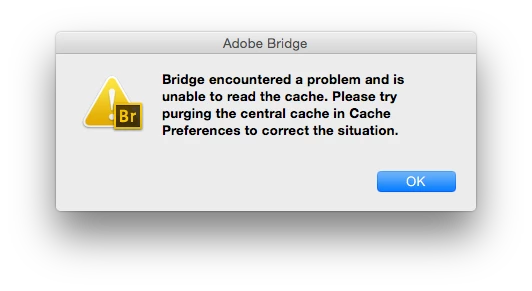
I keep getting the attached msg quite oftenly in Bridge cs6. I do what the msg advises me -in order to fix the problem- but the issue persists. I don't know what to do about it!

This topic has been closed for replies.
Correct answer Todd Shaner

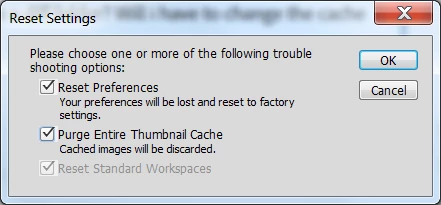
Try closing Bridge, restart it, and immediately hold down the Ctrl + Alt + Shift keys on a PC or Command + Option + Shift keys on a Mac. In the below pop up check the options as shown below.

1 reply

jbm007
Community Expert
Community Expert
March 5, 2018

Try saving your cache files in your folder where the images are.

genikAuthor
Known Participant
March 5, 2018

Thanks, but what happens when im will work on a different project located in a diff folder? Will i have to change the cache folder again?

Todd Shaner
Todd ShanerCorrect answer
Legend
March 5, 2018

Try closing Bridge, restart it, and immediately hold down the Ctrl + Alt + Shift keys on a PC or Command + Option + Shift keys on a Mac. In the below pop up check the options as shown below.