Participant
December 2, 2017
Answered

Camera Raw Problem (Yellow exclamation mark + Red Colour)

  • December 2, 2017
  • 2 replies
  • 4013 views

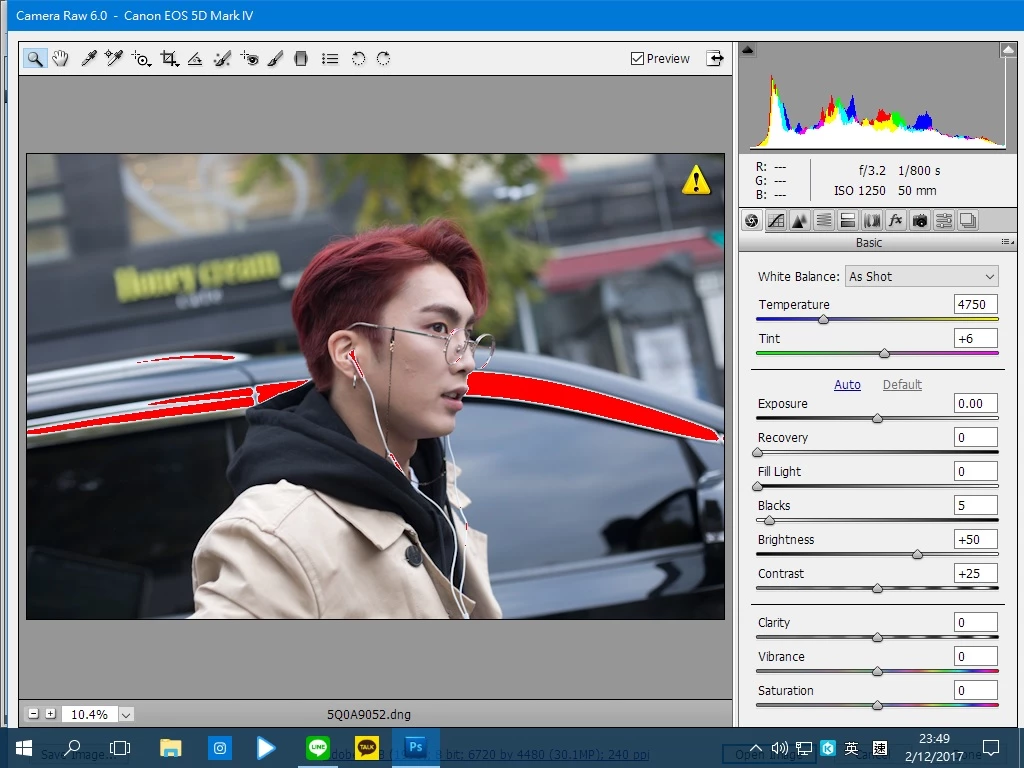
I use Camera Raw edit my photos (dng files) in half month before,at that time my photos still functioning properly in Camera Raw but today I open that photos want to edit again,it appear red colour in my photos,also the photos appear yellow exclamation mark......

I updated the software to Camera Raw 10 already and try to open it but still same......

Is there any idea can solve it?
This topic has been closed for replies.
Correct answer Stephen Marsh

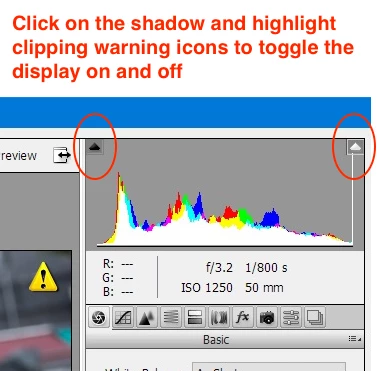
I think that you have highlight clipping warnings active:

2 replies

Jeff Arola
Community Expert
Community Expert
December 3, 2017

Photoshop cs5 can't use camera raw 10, only up to 6.7 and you have camera raw 6 so you should update to camera raw 6.7.

Install the latest adobe application manager and then use Help>Updates from within photoshop.

Adobe - Adobe Application Manager : For Windows : Adobe Application Manager

That yellow warning triangle means the image is not fully loaded. When the yellow triangle goes away, the image should become clearer.

Stephen Marsh
Community Expert
Stephen MarshCommunity ExpertCorrect answer
Community Expert
December 2, 2017

I think that you have highlight clipping warnings active:

toby_kauAuthor
Participant
December 3, 2017

omg!

Thank you so much!!!!