P.M.B
Legend
February 1, 2018
Answered

Can I stop image processor from creating sub folder? Also...

  • February 1, 2018
  • 1 reply
  • 2868 views

Hi.

So I have a few questions.  at least one, I think,  might be a Photoshop question

I've started to explore Bridge's tool>photoshop>image processor.

What I want is for the processed images to be put in the "same folder" folder they come from & ideally overwrite the original images.

Problem is whatever of the two options I choose for a destination, a sub-folder is created and the processed images are put there.

Q 1)  Is there a way to not have the sub-folder created?

Also,  when moving the  new processed images up into the parent folder where the original images are, the original images are not overwritten

even though the file names & types are exactly the same.

This is actually also a problem when I save manually from Photoshop.   Files don't get overwritten unless I select the file directly.

For example:

if I open a jpeg, resize it & then save it in the same folder with the same exact name/ext  it creates a duplicate file with the exact same name (no numerical or "copy"  suffix).

But if, when I go to save it,  I find the original file and select it, then I get the normal warning & it gets overwritten if I choose to proceed.

I've searched PS's prefs about this.

I notice in the save dialogue, for jpeg, in the save options "copy" is checked but the options are also greyed out so can't test to see if unselecting it

fix/change the behavior.

Q 2)  Why?   Is there some logic behind this? Is there a way to change this? It wastes so much time.

Thanks,

Paul 

Bridge 8.0.1.282

Photoshop 19.1.0

Windows 10

    This topic has been closed for replies.
    Correct answer Chuck Uebele

    Thanks Chuck,

    I do have some scripting experience...just enough to know I probably shouldn't mess with this as there's probably a series of conditional check loops called & I don;t want to break anything in the code.

    I did realize why files were not overwriting when moving them though which is the whole .jpg vs .jpeg.

    I download alot files from Stock and Stock only give .jpeg files on download.

    When I process them for any reason PS and Windows defaults to .jpg.

    This inconsistency causes duplicate files.

    I'll have to research more to find out if there's a work around.  For now I'll just deal with it and chalk it up to

    dealing with a huge company with a hundred hands, not all of which are working in coordination with the others.

    My wish now is that Photoshop could remember the specific file extension when saving instead of converting'

    a file that was  a .jpeg to .jpg.   That or Stock pushed .jpg in stead of .jpeg as that's what Photoshop & WIndows default to.

    Oh well.

    Thanks Again for your response


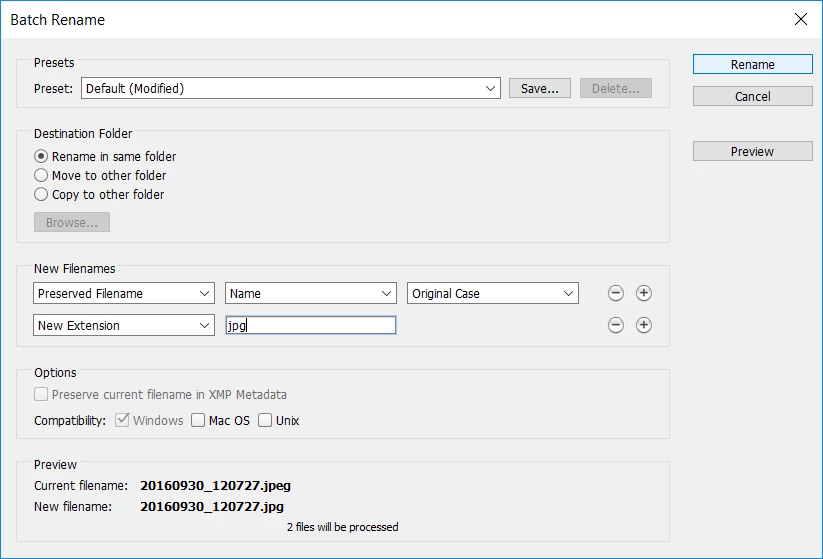
    So if you're having issues with the two types of file extensions, why don't you just batch rename all the files right after you download, to just the jpg extension in Bridge:

    1 reply

    Michael J. Hoffman
    Community Expert
    Community Expert
    February 1, 2018

    Hi Paul,

    Image Processor can create JPG, TIF or PSD output, and places the output in folders according to type both to provide easy organization, and to preven accidentally overwriting a source file.

    You can change the functionality of Image Processor if you understand javascript, as the entire Image Processor is written as a script. You can find the script in

    C:\Program Files\Adobe\Adobe Photoshop CC 2018\Presets\Scripts

    Make sure to save a copy and work on the copy!! And fiddle at your own risk.

    Regarding your issue of saving files from Photoshop with duplicate names, I'd have to see a little more detail and example. It's not possible to create a new file with exactly the same name and extension as an existing file, which you seem to imply happens. Can you provide a specific step-by-step example of that?

    Mike

    P.M.B
    P.M.BAuthor
    Legend
    February 2, 2018

    Hi Mike,

    I realize the problem with the saves.  .jpeg vs .jpg   DUH..

    Apparently PS uses .jpg unless explicitly told .jpeg

    Do you know of any way to work around this?

    Thanks

    ~Gutterfish
    Chuck Uebele
    Community Expert
    Community Expert
    February 4, 2018

    As Mike mentioned, if you know some scripting, you can modify the image processor file. You would have to find that section of code and modify it to not create the subfolder, then check to see if there is code for checking if to see if a file that is about to be saved exists. Normally, if you don't have this error checking, scripts will overwrite other files without any warning.