


Participant
Feb 23, 2024 5:03 PM UTC
Question

Can't open Scrivener files from Bridge with a double click

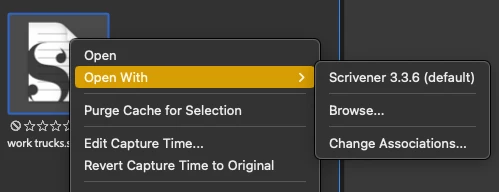
When I double click on a Scrivener file it won't open. I need to right-click and choose Scrivener, which IS set to be the system default for opening .scriv files.


All other third-party programs I use will open from Bridge via a double click, which is convenient as I have Bridge open all day on its own monitor.

A small glitch, to be sure, but it would be nice to see it fixed.
 

This topic is closed to new replies. Start a new post to keep the conversation going.

3 replies

Adobe Employee
Mar 4, 2024 10:48 AM UTC

Hi @multitalented_painter15D5 ,


Thanks for your feedback.
Could you share the following details about the issue:

  • Bridge version
  • System configuration

Please share the sample file/files on which you are observing the issue at sharewithbr@adobe.com and mention this thread.


Thanks,
Bridge Team

Translate
Legend
Feb 23, 2024 8:31 PM UTC

Works fine here on the Mac. Just downloaded and tested without making any changes or settings.

Translate
Participant
Mar 2, 2024 6:21 PM UTC

Glad it works for you. Doesn't work on either of my iMacs (2015 or 2020).

Translate