
Cannot get Adobe Bridge 18.0 work - problem in recognising Finder's Downloads folder!!!
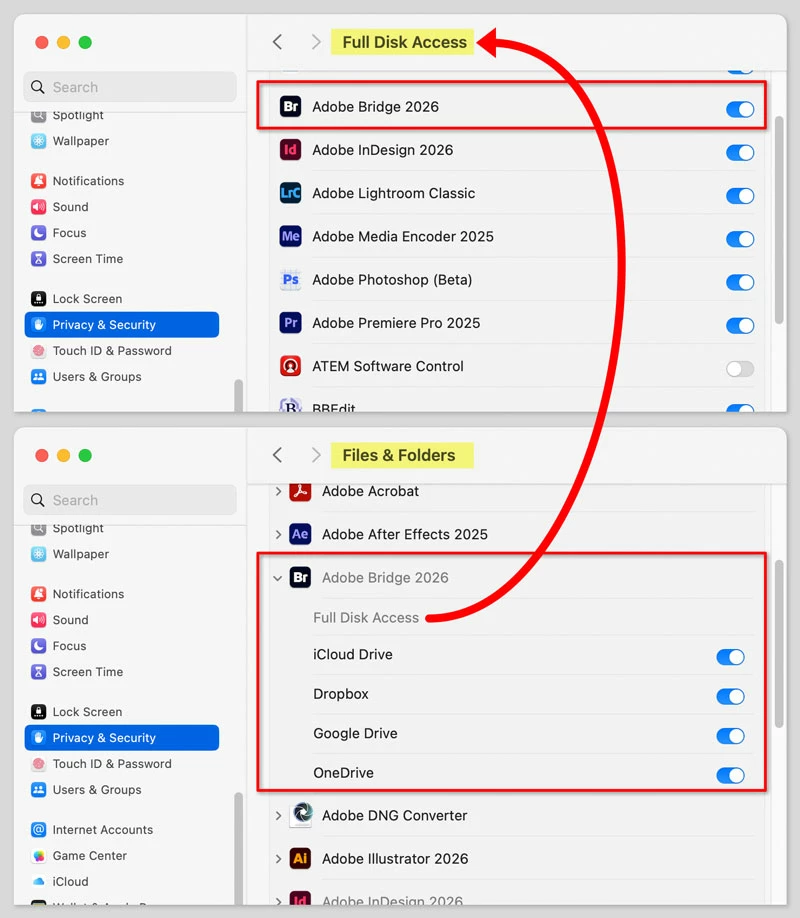
Seriously, I need help! I cannot remember well but I tried to do arrangements where my downloads go to (it is stupid that I cannot choose where I import files using Airdrop). As a result, I have a Downloads folder which appears and works fine at the Finder level. However, Adobe Bridge 18.0 is not able to show that folder: In Bridge, there is a strange icon as if there were a file icon above a folder icon! Even though its name is Downloads and it contains files normally in Finder, Bridge doesn't show any files in that "hybrid icon" folder. Eventually, I deleted Bridge by the CleanMyMac app and downloaded and installed a new one. Before, I booted my MBP M2. No avail! The strange icon is still there in Bridge and its corresponding one is nicely in Finder, without any strange icons! What can I do to get Bridge working as supposed??? Tahoe 26.1, MBP M2, 32MB, 1TB.


 AdChoices