Known Participant
March 25, 2017
Answered

Cant apply animation presets through Bridge

  • March 25, 2017
  • 1 reply
  • 1353 views

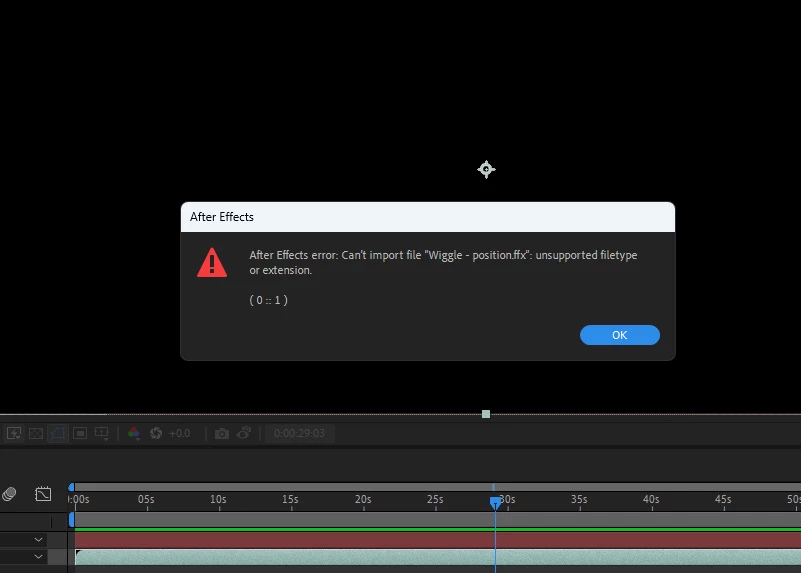
I am using the latest CC 2017 and all is up to date.  When I am in After Effects, I know I SHOULD be able to browse in Bridge animation presets and select one and double click it and it should apply to my layer that is selected in my comp.  It gives an error that it is an unsupported file type.  Seems many have experienced this from as far back as at least a couple years ago.  So Adobe cant fix this yet?  Even right clicking and selecting Place in Adobe After Effects doesn't work.  Yes I know there are other ways to apply the presets but the point is, this method is SUPPOSED to work.  When we pay a premium price for a product such as this with this monthly rental thing and the expectations that we will always be able to be updated to the newest and latest, we should have this working by now.  Is there a fix for this?

This topic has been closed for replies.
Correct answer PECourtejoie

Didn't work for me.  Dragging or doube-clicking on the file, I get the same error message.  I've uninstalled and reinstalled both Bridge and AE 2023 with no change:


Sorry, turns out it was a right click on the file, and apply in AE?

1 reply

Deepak_Gupta1
Participating Frequently
March 27, 2017

Hi,

Thanks for reporting the issue. We are working with After Effects team to get this investigated.

Thanks,

Deepak Gupta

Mike_Abbott
Legend
August 24, 2018

An old bug - but I'm happy to see that this has been fixed in After Effects 15.1.2

Known Participant
November 24, 2022

I'm experiencing the same thing in Bridge.  I can pull presets from the animation presets in AE, but every time I try and import a preset from Bridge - which I'd prefer to do because I can see image files upfront - I get the error message.