
Participant
April 16, 2019
Question

Cant eject hard drive because Bridge is holding it hostage.

  • April 16, 2019
  • 14 replies
  • 5729 views

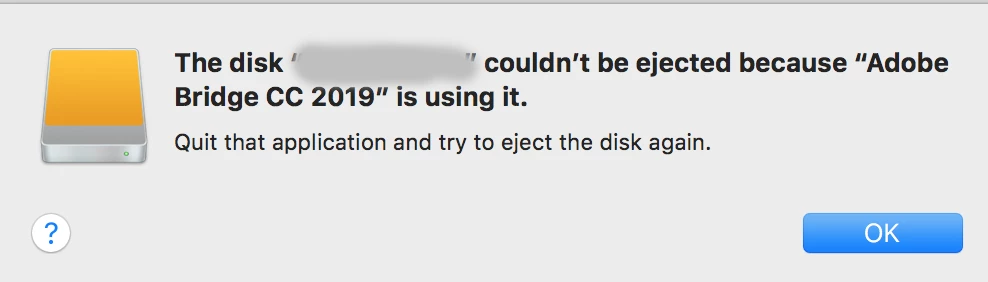
I try to eject the hard drive from Bridge and nothing happens.

I have to close Bridge entirely to be able to eject the hard drive from finder once Bridge has been open and browsed said hard drive.

I've been searching the forums for a similar problem/solution, but haven't found anything.

Can anyone point me towards a solution to this? I really like using Bridge over finder, but this but drives me up the wall.
    14 replies

    Participating Frequently
    June 30, 2020

    I'll add that I have been  havinging the same problem for months now.

    The only way to eject the disk is to quit bridge!

    Yes, please pull up your socks Adobe

    jbm007
    Community Expert
    Community Expert
    July 1, 2020

    Quick question.

    Does anyone have Bridge installed to open on Login or reboot?

    Jools808080
    Known Participant
    July 2, 2020

    Yes, I do. Recently added it to my autostart items again. 

    Participant
    November 11, 2019

    Hi Tony, did you get an answer from Adobe on this issue? Its November and Adobe 2020, problem still there. 

    preditorj40153117
    Inspiring
    February 5, 2020

    I was just about to post the same issue.
    In order to eject the drive, you have to close Bridge 10.0.2.131 and then eject via finder.
    that is not typical behavior for this application

    Participant
    March 30, 2020

    I have the same problem too, even when I close the finder it still does not let me eject my hard drive. I have closed every single program on my computer so there is no programs 'using' the hard drive and yet the error message still appears 

    Chuck Uebele
    Community Expert
    Community Expert
    April 17, 2019

    Okay, that's not right then. I'm on Win, and don't bother ejecting drives, never had an issue with not ejecting one.

    Participant
    November 11, 2019

    Yes, Please solve this issue on Mac, its has been like that since Day 1, unable to eject external drive on Mac Finder and unable to eject using Bridge as well. Have to close Bridge totally for it to work. Its November.

    Akash Sharma
    Legend
    April 17, 2019

    Hi TonyR12345,

    We're sorry that you're facing problems ejecting your external hard drive safely after you close Lightroom. Could you please let us know the exact version of Bridge CC you're using?

    Does Bridge still run in the background after you close it? (check in the Activity monitor to check this and kill the open task)

    Thanks,

    Akash

    Participant
    April 17, 2019

    Hello,

    You're misunderstanding the problem.

    I don't use lightroom (it's not even installed on my machine).

    I want to be able to eject the hard drive in Bridge:

    but I get the error above.

    The only way I am able to eject the drive is to completely quit bridge and then eject the drive.

    I don't want to have to quit bridge every time I want to switch drives. I didn't used to have to do this.

    Also, if it helps: I'm on the newest update of Adobe Bridge CC 2019

    Chuck Uebele
    Community Expert
    Community Expert
    April 17, 2019

    Have you tried making sure the active folder in Bridge isn't one on your external hard drive? Select a folder on your internal HD and try it.