Participant
July 22, 2023
Answered

Changing my copyrightstatus

  • July 22, 2023
  • 2 replies
  • 339 views

Hi,

I lost my personalised copyright information when I got a new laptop. And now I cann’t figure out how to set my own copyright text in Bridge. Can anyone tell me what I need to do?

Thanks!

Margot

This topic has been closed for replies.
Correct answer gary_sc

Yes, you can put your metadata into your camera but I can see that editing and updating that might be a bit of a chore.


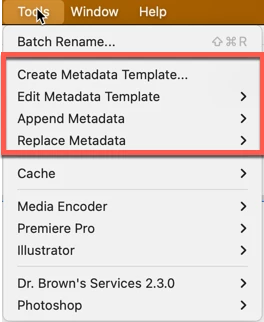
If you go to your Tools menu, right near the top are four menus where you can start your metadata list and update it as needed.


You can create as many different metadata templates as you need or want and update any of them quickly.


Good luck 


2 replies

gary_sc
Community Expert
gary_scCommunity ExpertCorrect answer
Community Expert
July 22, 2023

Yes, you can put your metadata into your camera but I can see that editing and updating that might be a bit of a chore.


If you go to your Tools menu, right near the top are four menus where you can start your metadata list and update it as needed.


You can create as many different metadata templates as you need or want and update any of them quickly.


Good luck 


Participant
July 24, 2023

Hi Gary,

thanks for your awnser, this was what I was looking for.

My complete copyright text is to long for the option in my camera.

Margot

gary_sc
Community Expert
Community Expert
July 24, 2023

Great, glad to help.


If you do not mind tapping the "Correct" answer underneath my answer, that will help others with the same issue.


Thank you!

Participating Frequently
July 22, 2023

you can now enter your copyright info in the menu of every camera; that information remains in your file whatever you do with it, you don't have to do that in bridge, kind regards

Participant
July 24, 2023

Thanks Eddy. I know this option, but I want to use the Bridge option because than I can use more text.

But with lesser text this would work great.

Margot