Participant
January 4, 2023
Answered

Color lables do not change the name and became white

  • January 4, 2023
  • 1 reply
  • 164 views

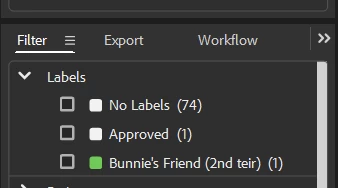
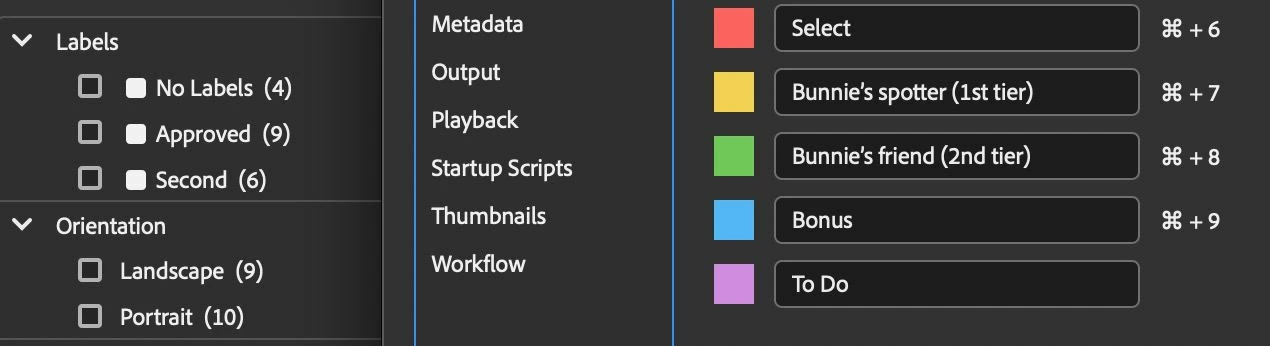
Why can there be such a problem with color labels? I added custom names to some of them, and after that all labels became white in the filter column, and the names did not change. At the same time, the changes were applied in the settings. I work on MacOS Ventura 13.1



This topic has been closed for replies.
Correct answer gregreser

Try applying the new green label to an image and you will see the custom name appear in the filter panel.


The problem is that the original labels were previously saved in your files. The label is saved in the metadata as the label text, e.g., "Approved". So you really do have 9 files with the "Approved" label. Changing the label text to a custom value doesn't go back and change the metadata previously saved, it only changes the label in new saves. You will have to select those previously labeled files and set the label again. This should overwrite the old label to your new custom label.

1 reply

gregreser
gregreserCorrect answer
Legend
January 4, 2023

Try applying the new green label to an image and you will see the custom name appear in the filter panel.


The problem is that the original labels were previously saved in your files. The label is saved in the metadata as the label text, e.g., "Approved". So you really do have 9 files with the "Approved" label. Changing the label text to a custom value doesn't go back and change the metadata previously saved, it only changes the label in new saves. You will have to select those previously labeled files and set the label again. This should overwrite the old label to your new custom label.