
Participating Frequently
August 25, 2025
質問

Color of the tab in Bridge and how to change it (NOT color labels)?

  • August 25, 2025
  • 返信数 2.
  • 122 ビュー

Hello. 


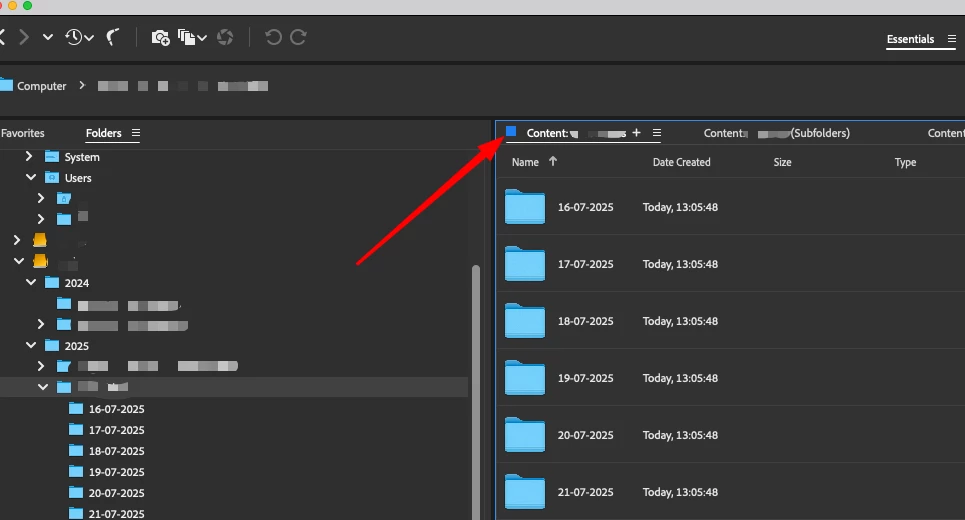
What does this color mean, and where do I change it? This is not the color label, used for sorting/filtering. This is something different. All my tabs have this blue color.


Thanks! 


返信数 2

Erik Bloodaxe
Legend
August 26, 2025

There was a hack posted in 2024 which gives a way to change this colour and works a treet if you have the patience to follow all the steps (very carefully!)

Here is a link to the discussion:

https://community.adobe.com/t5/bridge-discussions/workaround-disable-or-change-the-color-of-blue-borders-around-active-panels/m-p/14470966

gary_sc
Community Expert
Community Expert
August 25, 2025

Hi, @Genazvale, they mean nothing in general, but specifically, they mean that that's the active Content Tab. Nothing more, nothing less. Without them, you'd have nothing to let you know which Content Tab was active.


There has been discussion in these forums that people do not like the color or wish to change the color, but the Bridge team has not shown any indication that they wish to put aside other tasks they have to do that.

Genazvale作成者
Participating Frequently
August 26, 2025

Thanks, Gary! However, I don't think so. It was my initial thought as well, which is pretty obvious. But that function does the white underscore line below the tab name, just like in other Adobe apps. That's why I thought it doesn't make sense to have two signs to do the same job. 

But now I think that since this blue square is only visible when the tab is active, it doesn't make sense to customize it to distinguish the tabs (as in Premier), since it's not visible if not active. 

Mistery. Hopefully, someone from the team will shine the light.