Participant
June 19, 2018
Answered

converting to gray scale in CR

  • June 19, 2018
  • 2 replies
  • 233 views

hello

Cannot get the gray scale tab at Camera Raw. the sekected tab HSL donwt give the option

Work on Windows 10.

CR 10.4

Thanks

Ariel

    This topic has been closed for replies.
    Correct answer Norman Sanders

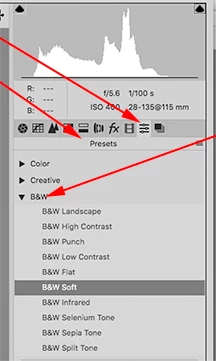
    Various grayscale conversions are available in the Presets section, after which you may use Basic or Curves, for example, for further adjustment. You may also click on the Black & White button in the Basic drop-down menu.

    2 replies

    Chuck Uebele
    Community Expert
    Community Expert
    June 20, 2018

    They moved the grayscale conversion in 10.4

    Norman Sanders
    Norman SandersCorrect answer
    Legend
    June 19, 2018

    Various grayscale conversions are available in the Presets section, after which you may use Basic or Curves, for example, for further adjustment. You may also click on the Black & White button in the Basic drop-down menu.