

The Little Hak
Participant
Nov 28, 2018 6:19 AM UTC
Question

.cr3 is not support in Adobe Bridge 2019

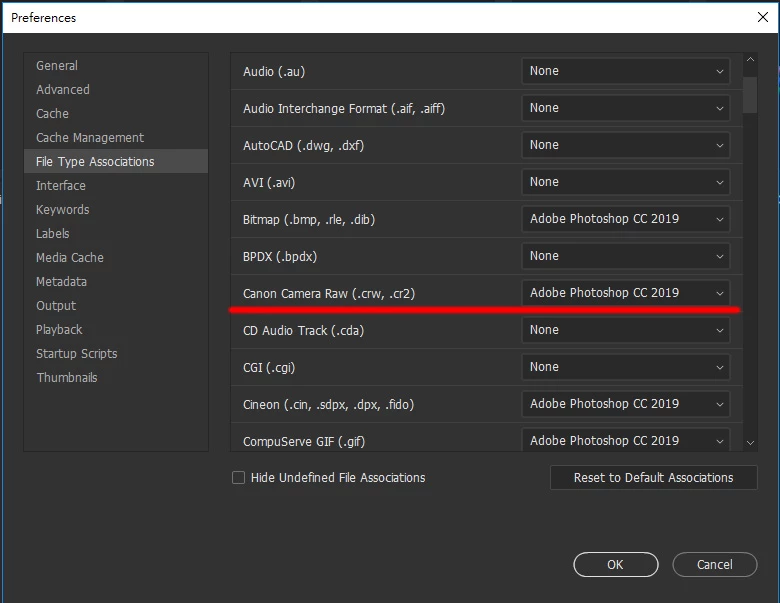
The new Canon Camera Raw format .cr3 is not in the Adobe Bridge file type association

When selecting a batch of .cr3 files, press Enter and Photoshop will not be processed in batches like .cr2


9 replies

The Little Hak
Participant
Apr 3, 2019 4:20 AM UTC

after half year,the Adobe Bridge still not support EOS R,  EOS RP & EOS M50 Raw files(.CR3)

Translate
Legend
Apr 3, 2019 12:46 PM UTC

Camera RAW supports these models and will work in Bridge.

Cameras supported by Camera Raw

Translate
The Little Hak
Participant
Apr 3, 2019 2:11 PM UTC

But still not support in Adobe Bridge file type association,

you can't open multiple .cr3 files in a batch

please check my screenshot,  Adobe Bridge file type association's Canon Camera Raw only have (.CRW & .CR2)

not support EOS R,EOS RP,EOS M50 yet ,because Adobe Bridge still not fully support .CR3

Translate
Adobe Employee
Nov 28, 2018 8:30 AM UTC

Thank you for sharing this feature request. I have added it to Bridge User Voice Feature Request page Add support for Cr3 files in file type associations – Adobe Bridge Feedback

Translate
The Little Hak
Participant
Nov 28, 2018 9:02 AM UTC

Thank you for your follow-up and hope to update it as soon as possible.

Now the Canon EOS R user can't process photos with photoshop's camera raw batch as before with .cr2 (eg.canon 5d iv)

Translate
PECourtejoie
Community Expert
Community Expert
Nov 28, 2018 10:58 AM UTC

I suggest to go and vote for that function, and invite other users in specialized forums to pile in and explain how it hurts their workflow.

Translate