Angela5885
Participant
March 28, 2018
Answered

CS6 Bridge Downloader shows icons not photo previes

  • March 28, 2018
  • 2 replies
  • 306 views

Hi There,

I have had this problem for a while and can't find an answer.

Currently I'm using Bridge version 9.1.1.461 and wince I have bought another camera (Nikon D7000) the photos in bridge downloader only show icons, no photo previews.

I have searched online and followed guides which told me to Purge Cache, reinstalled bridge, updated to te latest version and purged cache again.

The problem still occurs and I don't know what to do to fix it.

I hope somebody can help me.

many thanks!

Angela

Bridge General DiscussionPhotoshop

This topic is closed to new replies. Start a new post to keep the conversation going.
Correct answer Brad Lawryk

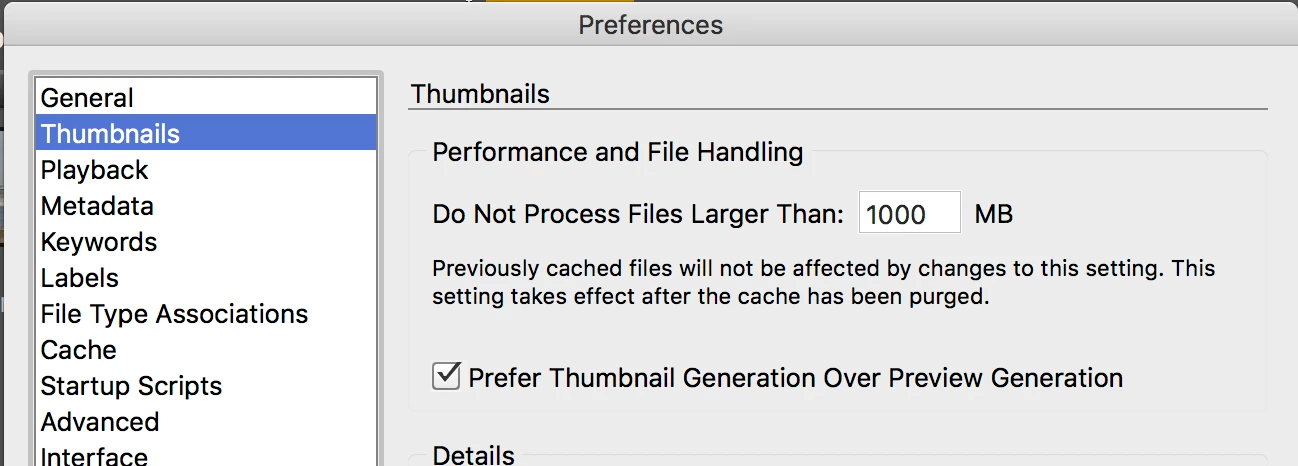
In your Bridge preferences check to see what you have set for a maximum file size. It's possible that your new camera is generating images larger than you have set in your preferences for thumbnails.

2 replies

Brad Lawryk
Brad LawrykCorrect answer
Legend
March 29, 2018

In your Bridge preferences check to see what you have set for a maximum file size. It's possible that your new camera is generating images larger than you have set in your preferences for thumbnails.

Sahil.Chawla
Adobe Employee
Adobe Employee
March 28, 2018