
Participant
June 30, 2020
Question

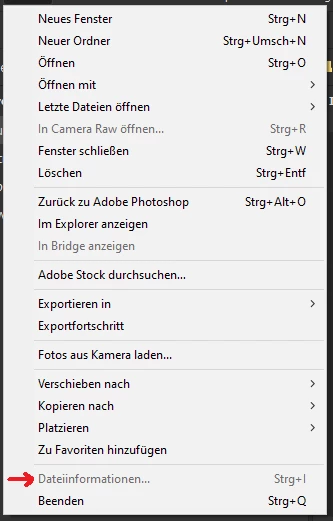
Dateiinformationen können nicht bearbeitet werden

  • June 30, 2020
  • 1 reply
  • 247 views

Ich habe soeben die Version 10.1.0.163 von Bridge installiert. Mein aktuelles Problem besteht darin, dass ich das Fenster "Dateiinformationen" nicht öffnen kann. Sei dies via Shortcut (Ctrl & I), via Kontextmenu, etc. Zudem geschieht dies, wie zufällig, nur bei manchen neuen sowie auch alten Dateien und diversen Dateiformaten, wie raw's, tif's, jpg's, ...
 

This topic has been closed for replies.

1 reply

jbm007
Community Expert
Community Expert
July 1, 2020

Try resetting your Bridge preferences.


  • Start Adobe Bridge and immediately press Ctrl+Alt+Shift (Windows) or Command+Option+Shift (Mac OS) until the Reset Settings dialog box appears.
  • Select all three options--Reset Preferences, Reset Standard Workspaces, and Purge Entire Thumbnail Cache--and then click OK.
timott.chAuthor
Participant
July 1, 2020

After doing that, I can now edit jpg's, but raw's and tif's for example are still blocked. Also the file previews wont load at all for these two.