Participating Frequently
September 24, 2020
Answered

Desktop on Btridge

  • September 24, 2020
  • 2 replies
  • 279 views

I've used Bridge since it started...... many versions and several computers ago..

Now I cant view my desktop- only Dropbox/Hard Drives etc (Desktop shows empty)

I'm using Catalina..

Sort yourself out Adobe..


Thanks



This topic has been closed for replies.
Correct answer gary_sc

Hi Lindsay,


Thanks for letting me know that you're using Catalina however I knew that without your even telling me.


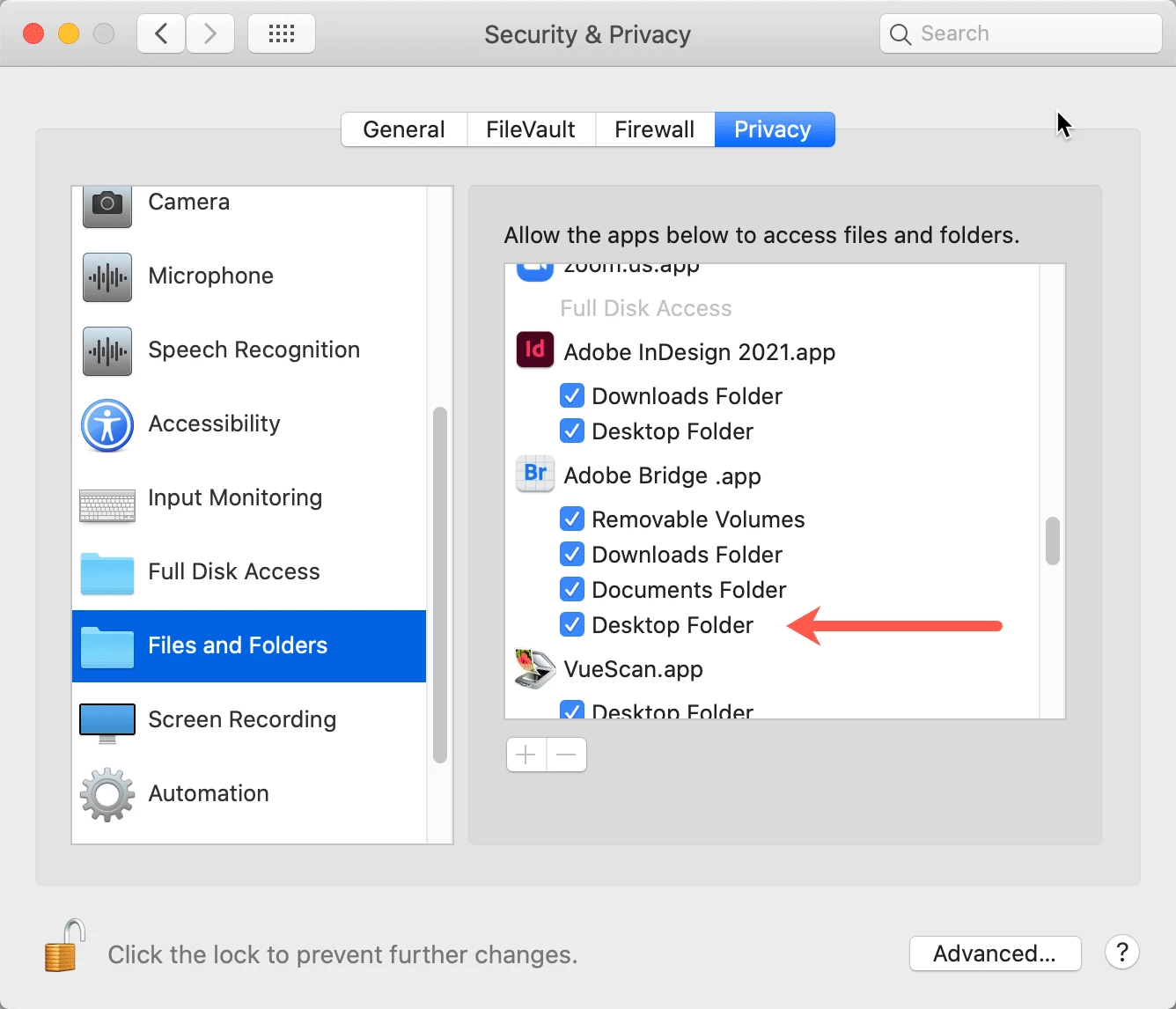
Here's what you need to do: Go into your System Preferences, go to the Security & Privacy Option. First go to the bottom left corner and click on the lock and then enter your Administrator password. Then scroll down to the Files &  Folders section. If you do not see Bridge in the list, click on the "+" symbol and add it. Make sure that you've checke all of the options listed INCLUDING THE ONE FOR THE DESKTOP FOLDER. While you're there be sure you go op to the Full Disk Access option on the left hand side and be sure to Add Bridge there if it's not listed.


This has nothing to do with Adobe, it's Apple doing all that it can to try to help people against bad things by bad-brained individuals. So please put the blame where it deserves, those bad-brained individuals, not Adobe or Apple.
 

2 replies

Participating Frequently
September 24, 2020

Hi Gary, Thanks for trying to help- unfortunately I did everytjhing you said -to the letter- and it is not working.. I am getting in the Privacy option Bridge showing "Full Disk Access" - (which is in a light gray) in the Files and Folders. Full Disk Access shows Bridge as checked

I dont know where the fault lays, but I've been working daily with Bridge and Camera RAW since it's inception. If it does not work as it has previously it seems natural to lay blame with Adobe..


Many Thanks for trying to help

Participating Frequently
September 24, 2020

Hi Gary,

I would add that tyhis applied only to Bridge 2020

I have Bridge 2018 still installed and this works fine- all check boxes are marked the same

I would continue to use Bridge 2018 but am getting the "RAW not enabled" message (even though I used it for 2 years prior to installing Bridge 2020..

Very Frustrating


Thanks again


Lindsay Keats


gary_sc
Community Expert
gary_scCommunity ExpertCorrect answer
Community Expert
September 24, 2020

Hi Lindsay,


Thanks for letting me know that you're using Catalina however I knew that without your even telling me.


Here's what you need to do: Go into your System Preferences, go to the Security & Privacy Option. First go to the bottom left corner and click on the lock and then enter your Administrator password. Then scroll down to the Files &  Folders section. If you do not see Bridge in the list, click on the "+" symbol and add it. Make sure that you've checke all of the options listed INCLUDING THE ONE FOR THE DESKTOP FOLDER. While you're there be sure you go op to the Full Disk Access option on the left hand side and be sure to Add Bridge there if it's not listed.


This has nothing to do with Adobe, it's Apple doing all that it can to try to help people against bad things by bad-brained individuals. So please put the blame where it deserves, those bad-brained individuals, not Adobe or Apple.