
Inspiring
August 4, 2022
Answered

Disable horizontal scrollbar

  • August 4, 2022
  • 2 replies
  • 1550 views

When viewing images in Bridge, I often get a horizontal scrollbar and it displays all the images in one row.


I have zoom out in order to view them as more of a 'gallery / thumbnail' view.


Is there a way to do this without having to zoom out? I'd like them to be large, but without side-scrolling

This topic has been closed for replies.
Correct answer gary_sc

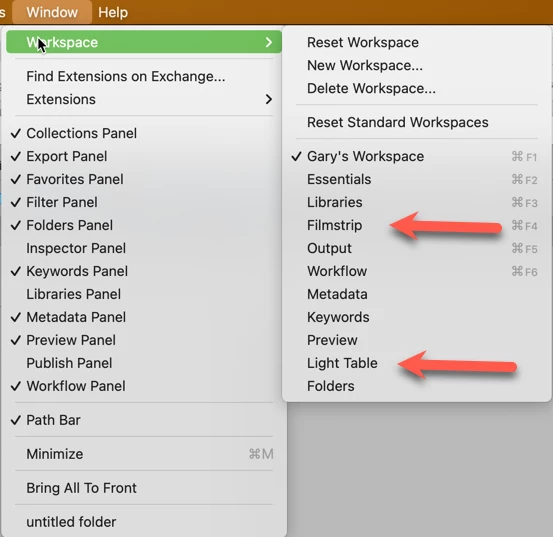
It sounds like you're in the Filmstrip workspace. Go to Window -> Workspaces -> and try out Light Table. That might be what you want.

2 replies

Enchanted_passion5E88
Participant
June 23, 2024

In the header of the Content panel, there is a hamburger menu where you can choose between Horizontal and Vertical layout:

P.S.: I see that this is a 2 yrs old question now, but others who search the web might end up here.

Participant
June 30, 2024

Thank you sir! This is the correct solution vs the "Light table" option mentioned above

gary_sc
Community Expert
gary_scCommunity ExpertCorrect answer
Community Expert
August 4, 2022

It sounds like you're in the Filmstrip workspace. Go to Window -> Workspaces -> and try out Light Table. That might be what you want.

Participant
August 17, 2024

Thanks for your help. Perfecto.