

NickLucas
Inspiring
November 16, 2019
Question

Display issue after processing RAW image in Bridge 2020 on macOS Catalina

  • November 16, 2019
  • 1 reply
  • 405 views

I'm using Catalina 10.15.1 and Bridge 2020. After processing a RAW image the thumbnail is sometimes displayed with an overall pink hue. Using Tools=>Cache=>Purge Cache restores the thumbnail.  
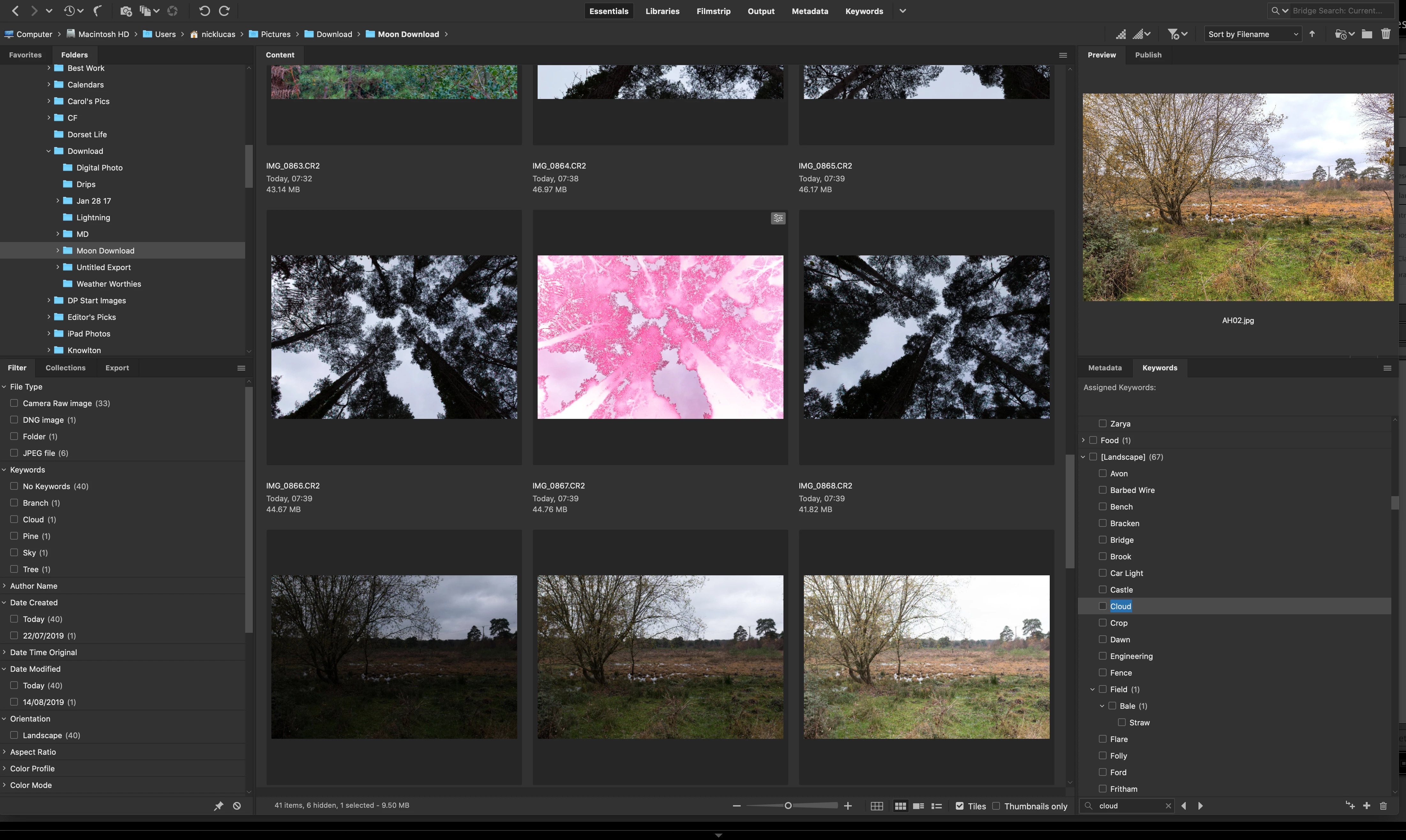


{thread title edited by moderator}

This topic has been closed for replies.

1 reply

nikunj.m
Legend
November 20, 2019

Hi there,


We are sorry about the issue you are facing with the image previews in Bridge 2020.


Please go to the Preferences for Bridge, select Advanced and check the option to Use Software Rendering. Then go to Cache, increase the Cache size to almost 1.5 times or twice of the level currently set and check the option to Compact Cache on Exit. Once you have made the changes, quit and relaunch Photoshop to check if that helps.


Regards,

Nikunj

NickLucas
NickLucasAuthor
Inspiring
November 24, 2019

Not fully tested yet, but many thanks for the swift reply.