outsiderk
Participating Frequently
Oct 9, 2019 11:59 PM UTC
Question

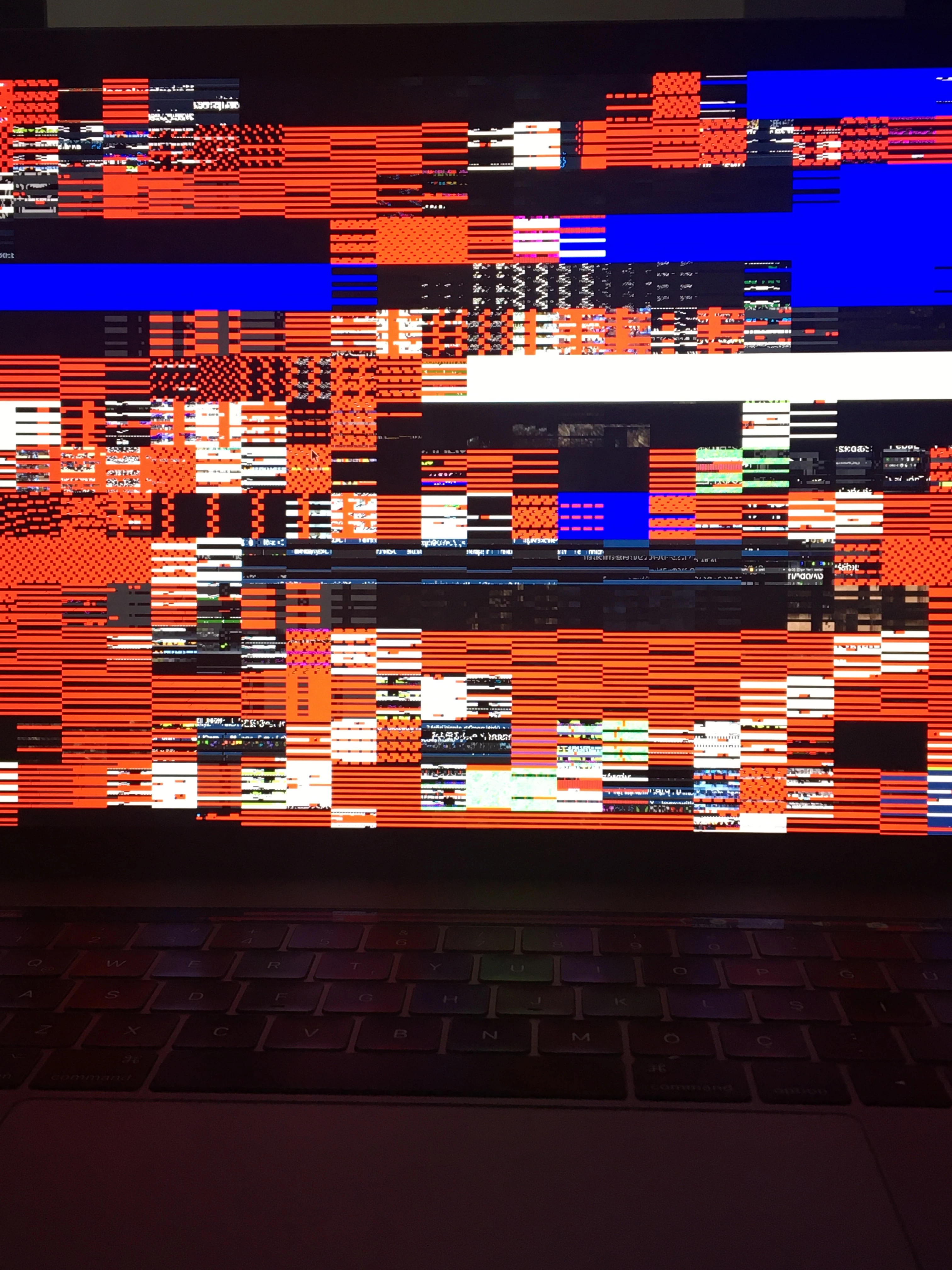
Distorted full preview in Bridge

Hi guys,


My whole photo previews are distorted when I display them as fullscreen. It happened when I upgraded my computer to macOS Catalina. 


Any idea about the solution?


This topic is closed to new replies. Start a new post to keep the conversation going.

51 replies

Participant
Oct 17, 2019 3:56 AM UTC

Also here 😞
After the Catalina update, the problem is still ongoing ...
Please Adobe soon solution !!!

Translate
outsiderk
outsiderkAuthor
Participating Frequently
Oct 16, 2019 4:52 PM UTC

After the update, the problem is still ongoing. I don't know is Adobe has any answer or explanation to this problem. It is a huge issue, my whole working process has been ruined for days.

Translate
Participating Frequently
Oct 16, 2019 4:50 PM UTC

Correction to my earlier post. Following the Catalina update and the Creative Cloud update full-screen preview is still messed up. This seems to be a pretty basic problem. Why is not sorted? Software rendering is not an adequate, professional solution.

Translate
Participant
Oct 16, 2019 12:55 PM UTC

Hallo,
ich habe seit dem Update auf MacOS Catalina wirre Pixel auf den Vorschaubildern in Bridge.
Ein Arbeit ist somit unmöglich. Neuinstalltion bringt keine Verbesserung.

Hat jemand ein ähnliches Problem und hat eine Lösung im Angebot?

Liebe Grüße

Marc Kosicki


{Thread title edited by moderator}

Translate
nikunj.m
Legend
Oct 16, 2019 2:55 PM UTC

Hi Marc,


Would you mind going to the Preferences for Bridge > Advanced and check the option to Use Software Rendering. Once you check the option, quit Bridge and relaunch it to check if that helps with the previews.


Regards,

Nikunj

Translate
Participant
Oct 17, 2019 4:47 AM UTC
ohh thank you! it works!
Translate
Participant
Oct 16, 2019 11:22 AM UTC

CATALINA 10.15 UPDATE DID NOT HELP ME (MBP 15" 2018).  After the update, I am still with the same distortion in Bridge.

Translate
Participant
Oct 16, 2019 11:30 AM UTC
After writing that review, it seems to be working fine now.
Translate
emanueleferrariph
Inspiring
Oct 16, 2019 9:57 AM UTC

Today Mac osx update... Solved for me !

Translate
Participating Frequently
Oct 16, 2019 11:15 AM UTC
Yes, and here too. Thanks!
Translate
outsiderk
outsiderkAuthor
Participating Frequently
Oct 15, 2019 3:32 PM UTC

After a clean install of macOS Catalina, the problem is still ongoing.

Translate
outsiderk
outsiderkAuthor
Participating Frequently
Oct 13, 2019 6:58 PM UTC

If you choose software rendering the problem will be solved. However, with software rendering switching preview to another will be much slower.

Translate
HanselV
Participant
Oct 13, 2019 7:01 PM UTC
Tried that and still does it.
Translate
HanselV
Participant
Oct 13, 2019 6:53 PM UTC

Same issue here on my Macbook Pro 2019 since upgrading to Catalina.  Everything is up to date on the Adobe end.

Translate
Participant
Oct 12, 2019 2:19 PM UTC

Here too the problem after update to Catalina
Worked well for a while and then suddenly the problem and now still does not work I hope a solution soon ...
(MacBook Pro 2016)

Translate
JoeICON
Participant
Oct 12, 2019 3:19 PM UTC
Same problem for me in my 2017 MacBook Pro, no problem on my 2012 also running Catalina
Translate
