

Participating Frequently
March 18, 2023
Question

Docking logic?

  • March 18, 2023
  • 1 reply
  • 1061 views

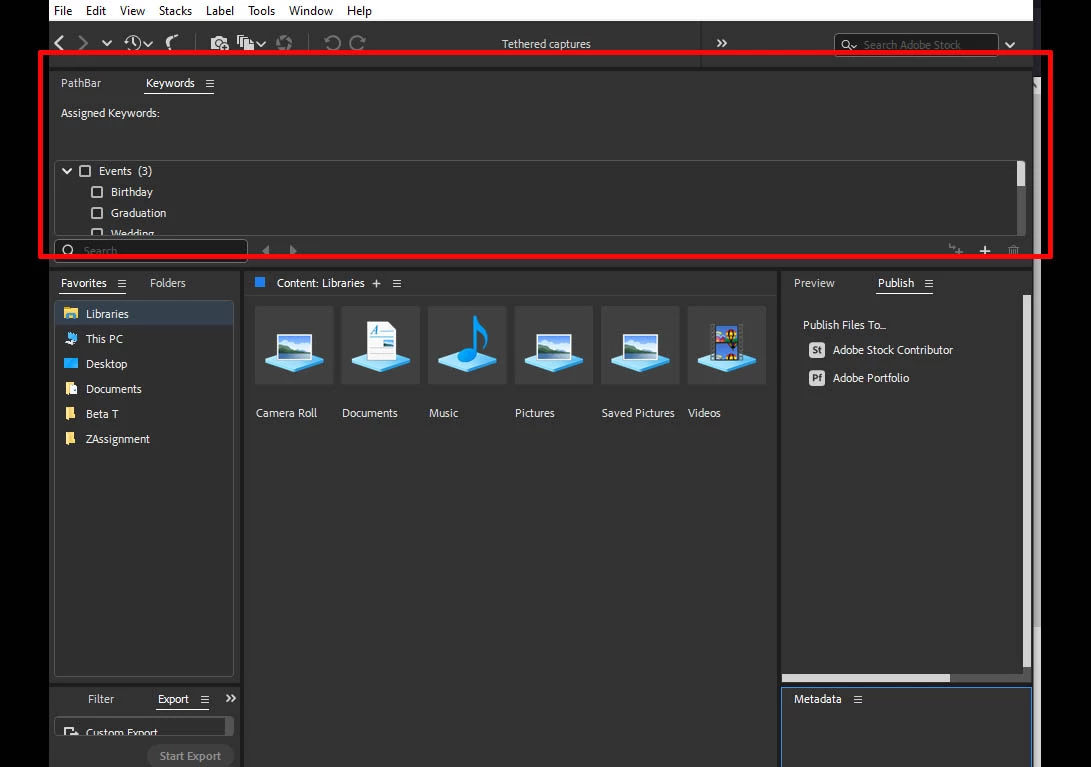
Where is the value in allowing vertically designed panels to be docked so that they occupy the full width of the pathbar location hiding important path info and wasting enormous amounts of screen real estate?

 

This topic has been closed for replies.

1 reply

gary_sc
Community Expert
Community Expert
March 18, 2023

That appears to be a Workspace of your own creation, is it? You are correct that these (not Pathbar) are better suited for a vertical location, but these were put in a location that spans the entire width of the Bridge Window.


Also, just to let you know, Bridge does not provide any real tethering as one can obtain in Lightroom Classic. There, you can get a full-screen view of what the camera is seeing before any photo is taken. That cannot be done with Bridge. At best, you can only see what the camera took after the photo was taken (but I'm not sure if the image file can automatically be transferred to the computer. Can it? Are you able to get that to happen?


Those Panels do not make any sense the way they appear. Pathbar shouldn't be there; it should rest below the icons just above it. 


Nonetheless, this is a Workspace of your own creation; I'd suggest you try again.


FWIW, I find my Workspace to be very functional and provides most of my needs, copy the design and see if it helps you. You are in no way obligated to duplicate this, but you may get some ideas that you can use.


Participating Frequently
March 18, 2023

Gary,

My question was based on a simple testing of the various docking locations available in the new Bridge.  The vast majority of panels in Bridge are designed to present information vertically.  What value does Adobe see in opening up the full-width pathbar location for the docking of vertically formatted information? What am I missing?

gary_sc
Community Expert
Community Expert
March 18, 2023

Good question. I think it has to do with the fact that any Panel can potentially go anywhere. Yes, that's (I'd call it "too busy to do it right" programming where they let any Panel go to any location. I suppose they could have created built-in restrictions, but that would take time, and, as we've seen with release 13, that's something that they didn't have.


If you have any other theories, I'd be curious to hear them.