
fredm67185203
Participant
May 29, 2017
Answered

Drop down selection has multiple Photoshop listed

  • May 29, 2017
  • 2 replies
  • 263 views

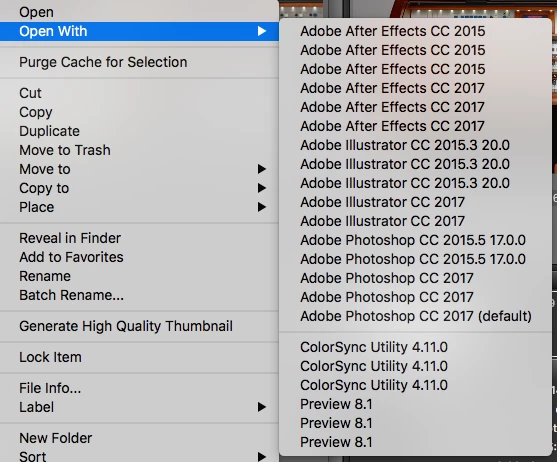
After updating and changing out the primary drive, this interesting dropdown happens when you are in bridge select an image, then right click to open with: you get

multiple choices of each program, yet, only one of each is installed.  How do I eliminate the additional items?
    This topic has been closed for replies.
    Correct answer Sahil.Chawla

    Hi fredm,

    You can try resetting the preferences of Bridge by following the steps below:

    Start Adobe Bridge and immediately press Ctrl+Alt+Shift (Windows) or Command+Option+Shift (Mac OS) until the Reset Settings dialog box appears. Select all three options--Reset Preferences, Reset Standard Workspaces, and Purge Entire Thumbnail Cache--and then click OK.

    Regards,

    Sahil

    2 replies

    fredm67185203
    Participant
    June 8, 2017

    Thank you, that worked.

    Sahil.Chawla
    Adobe Employee
    Adobe Employee
    June 8, 2017

    Glad that you got it working now, feel free to reach out to us for any future queries.

    Sahil.Chawla
    Adobe Employee
    Sahil.ChawlaCorrect answer
    Adobe Employee
    June 8, 2017

    Hi fredm,

    You can try resetting the preferences of Bridge by following the steps below:

    Start Adobe Bridge and immediately press Ctrl+Alt+Shift (Windows) or Command+Option+Shift (Mac OS) until the Reset Settings dialog box appears. Select all three options--Reset Preferences, Reset Standard Workspaces, and Purge Entire Thumbnail Cache--and then click OK.

    Regards,

    Sahil
