Participant
March 4, 2022
Answered

En bridge veo el disco externo, pero no se ven los archivos. en finder perfecto funciona.

  • March 4, 2022
  • 3 replies
  • 1672 views

El disco externo, se ve en finder y funciona perfecto . En bridge se ve el disco pero no puedo entrar a ver los archivos, probe en otra compu y anda perfecto en bridge y en finder..... tambien probe otro disco en mi bridge y tiene el mismo problema, alguien tuvo este inconveniente, lo pudoieron solucioonar? Mil gracias

This topic has been closed for replies.
Correct answer gary_sc

As JMB007 said, it's probably a Mac permission thing. Please try this:


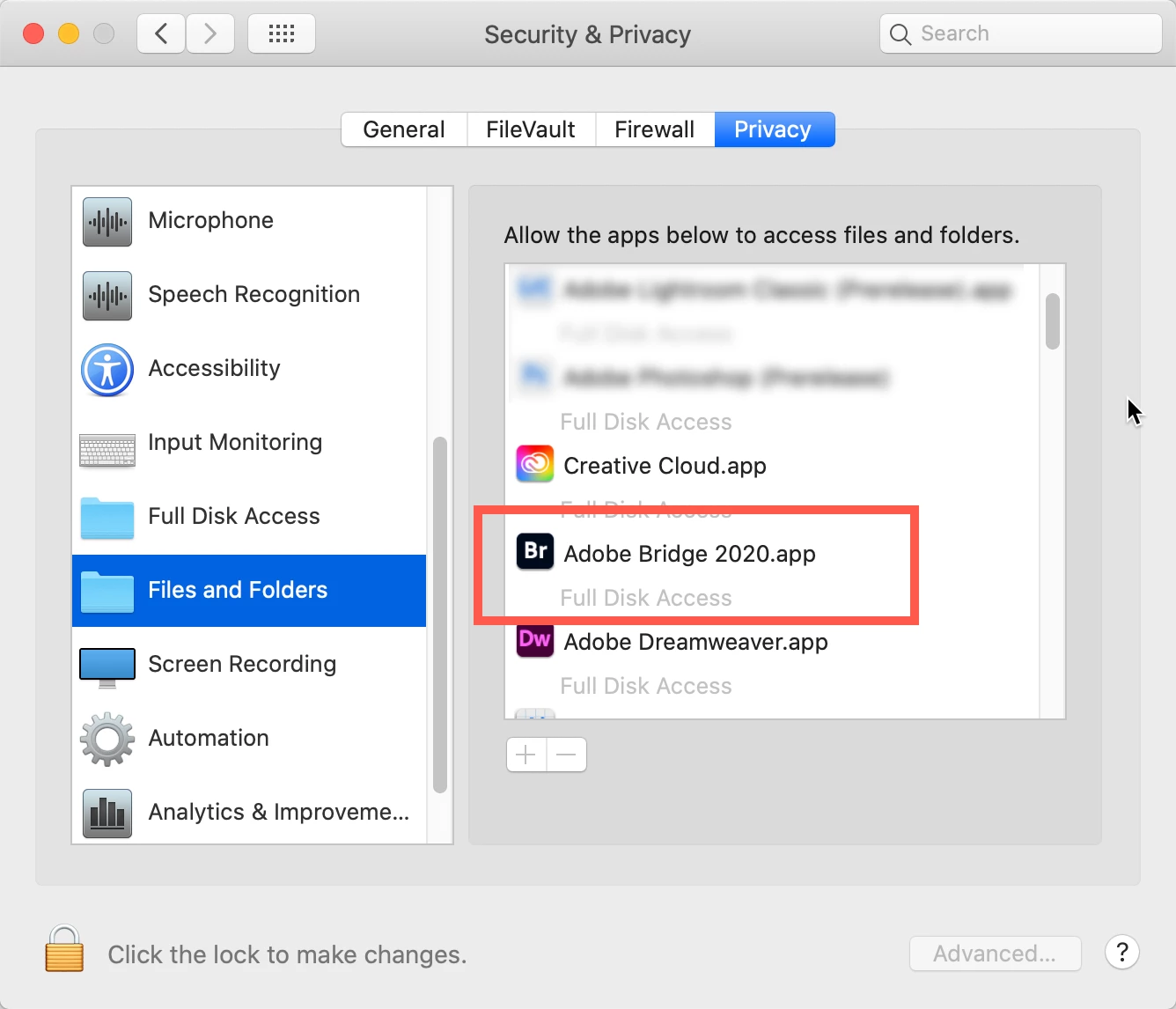
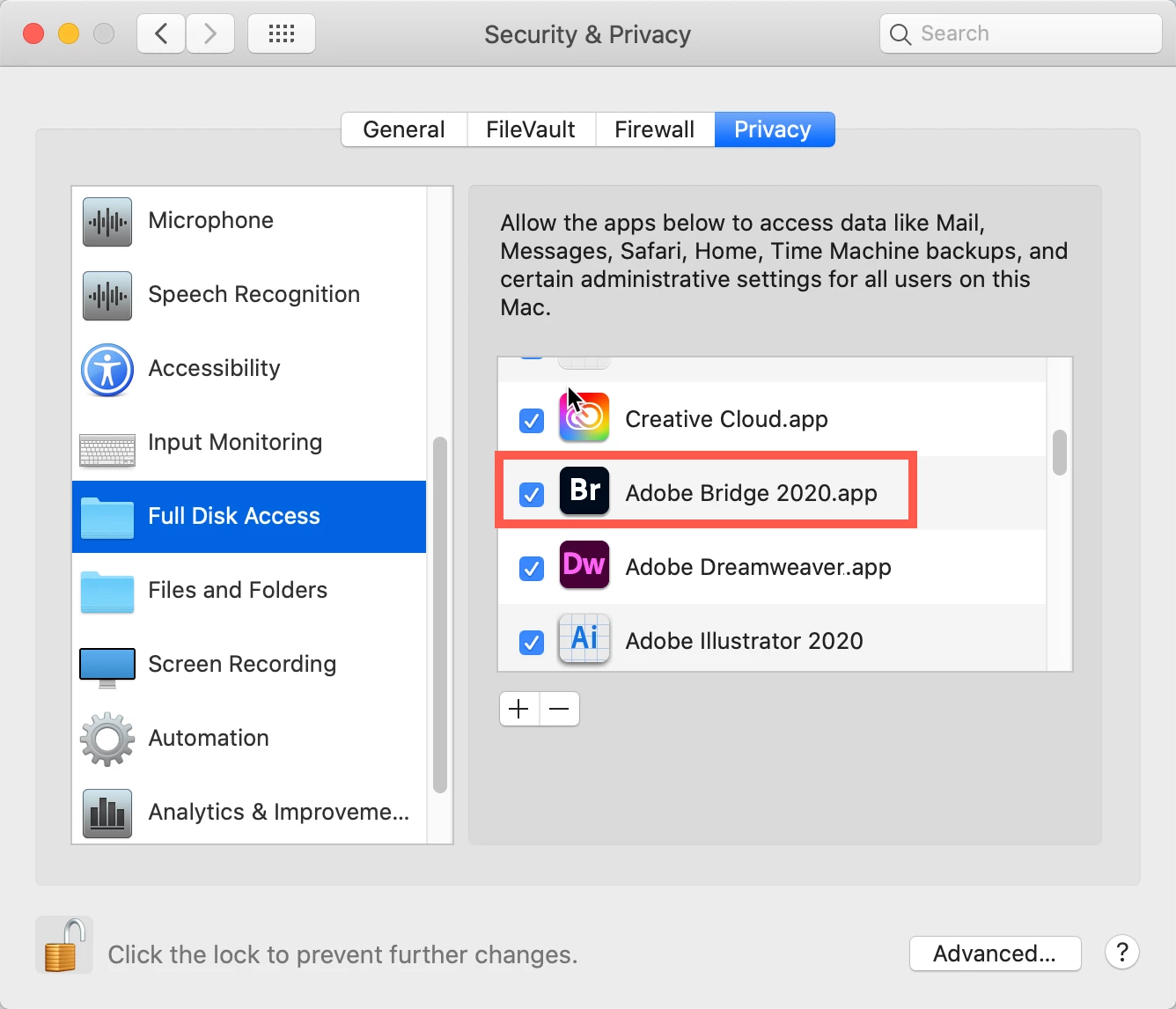
Go to your System Preferences and select Security and Privacy (found in the top section). Now click on the Privacy setting (last tab). Now click on the lock on the bottom left and provide your Administrator code. Now select the Full Disk Access option and click on the "+" symbol. This will bring up the standard Mac Open window and let you add any application you want or need to have full access. Look for Bridge, select it, it will now appear in that window and make sure it's checked. Next, go to the Files and Folders option and do the same thing as above (although there's nothing to check, just add. Close everything down and see if that makes it all work.

Please let me know

[Note: these images are from an older OS, the process is the same.]


3 replies

gary_sc
Community Expert
gary_scCommunity ExpertCorrect answer
Community Expert
March 20, 2022

As JMB007 said, it's probably a Mac permission thing. Please try this:


Go to your System Preferences and select Security and Privacy (found in the top section). Now click on the Privacy setting (last tab). Now click on the lock on the bottom left and provide your Administrator code. Now select the Full Disk Access option and click on the "+" symbol. This will bring up the standard Mac Open window and let you add any application you want or need to have full access. Look for Bridge, select it, it will now appear in that window and make sure it's checked. Next, go to the Files and Folders option and do the same thing as above (although there's nothing to check, just add. Close everything down and see if that makes it all work.

Please let me know

[Note: these images are from an older OS, the process is the same.]


Participant
March 21, 2022
Thanks a lot!! I got it by following your instructions.
I was going crazy not being able to see the files.
Thanks for the information.
jbm007
Community Expert
Community Expert
March 20, 2022

Its Mac OS access permissions issues.


there are other threads with similiar issues

Participant
March 19, 2022

a mi me pasa lo mismo. Pero no he tenido oportunidad de instalarlo en otro ordenador. Yo tengo un mac y no se si sera por eso. Tampoco me lee las tarjetas sd. Se ve, pero no entra en los archivos