Participant
April 7, 2025
Answered

EXIF data in filename

  • April 7, 2025
  • 3 replies
  • 522 views

Hello


is there a way to add metadata (EXIF) to photo filenames.

Example "ABCD9999.JPG"

to

"ABCD9999 - 50mm - ISO200 - F16 - SEC1-125.JPG' 

name            lens       ISO           AP    Shutter


Thanks for suggestions and examples.

Correct answer Stephen Marsh

@TJFotografie 


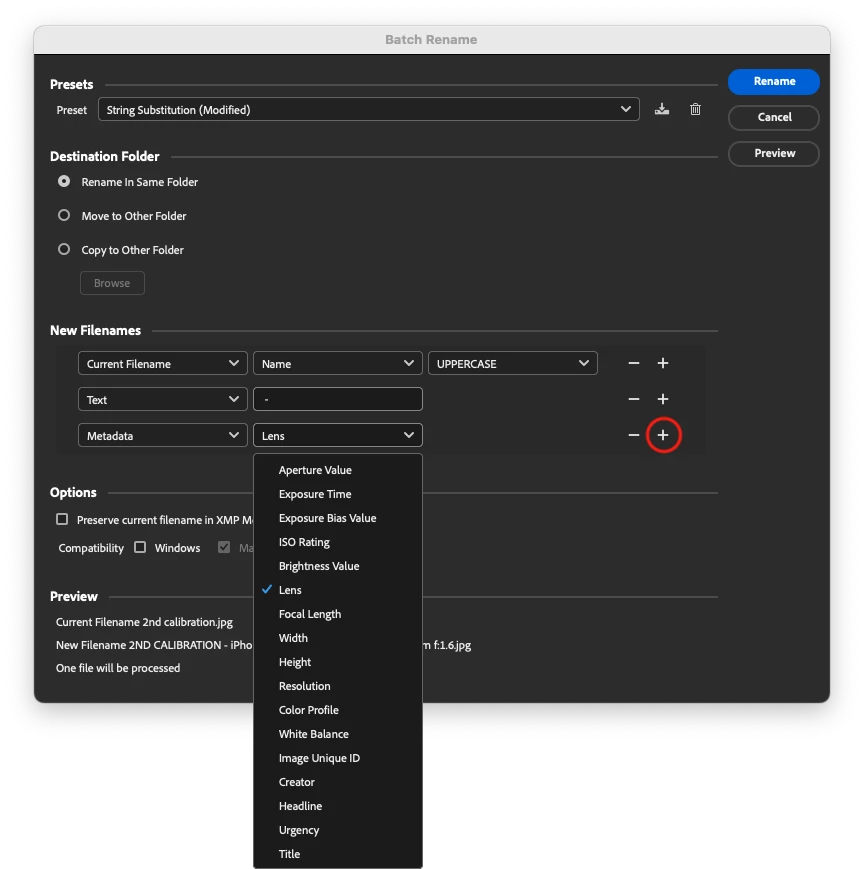
As @jane-e wrote, Tools > Batch Rename can use a limited set of metadata sources.


You would need a custom script or another utility if you needed something that isn't available in the dropdown. Always keep in mind that filenames and metadata may have different requirements for special characters.

3 replies

Stephen Marsh
Community Expert
Stephen MarshCommunity ExpertCorrect answer
Community Expert
April 7, 2025

@TJFotografie 


As @jane-e wrote, Tools > Batch Rename can use a limited set of metadata sources.


You would need a custom script or another utility if you needed something that isn't available in the dropdown. Always keep in mind that filenames and metadata may have different requirements for special characters.

Participant
April 11, 2025

Thank you. I wil doenload Bridge and take a good look. Seems that this screen points me to the right answer.

Stephen Marsh
Community Expert
Community Expert
April 11, 2025

You're welcome, Bridge is the natural place to do this, other Adobe apps would require a custom script.

kglad
Community Expert
Community Expert
April 7, 2025

in the future, to find the best place to post your message, use the list here, https://community.adobe.com/

p.s. i don't think the adobe website, and forums in particular, are easy to navigate, so don't spend a lot of time searching that forum list. do your best and we'll move the post (like this one has already been moved) if it helps you get responses.


<"moved from cc desktop">
jane-e
Community Expert
Community Expert
April 7, 2025

@TJFotografie 


Try Tools menu > Batch Rename in Adobe Bridge. Watch the Preview at the bottom to confirm you are getting what you expect (such as spaces and dashes) before you click OK.

Jane

Participant
April 11, 2025

Thank you. I wil download Bridge and take a good look.

jane-e
Community Expert
Community Expert
April 11, 2025

You're welcome @TJFotografie . Let us know how it goes!

Jane