Participant
July 15, 2017
Answered

Export/Import Tags

  • July 15, 2017
  • 1 reply
  • 1195 views

I have a large drive of photos that are tagged in Bridge. Is there a way to export the tags and import them into Bridge on another machine?

This topic is closed to new replies. Start a new post to keep the conversation going.
Correct answer Stephen Marsh

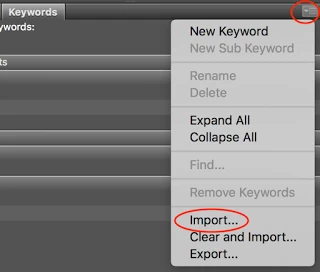
Are all of the keywords in the Keywords panel in Bridge in defined keywords/sub-keyword categories as roman/upright text? If so you can simply export/import from plain text file:

Or are there keywords applied to images that are not in the panel in categories and are listed under “Other Keywords” in italics? If so, you will need to work a bit harder  (see the link below).

There are various methods, depending where/how keywords have been applied.

More here:

Prepression: Bridge – Restoring a Lost Keyword XML File

1 reply

Stephen Marsh
Community Expert
Stephen MarshCommunity ExpertCorrect answer
Community Expert
July 16, 2017

Are all of the keywords in the Keywords panel in Bridge in defined keywords/sub-keyword categories as roman/upright text? If so you can simply export/import from plain text file:

Or are there keywords applied to images that are not in the panel in categories and are listed under “Other Keywords” in italics? If so, you will need to work a bit harder  (see the link below).

There are various methods, depending where/how keywords have been applied.

More here:

Prepression: Bridge – Restoring a Lost Keyword XML File