Participant
April 23, 2023
Answered

externe Festplatte zeigt es im Bridge nicht mehr an

  • April 23, 2023
  • 3 replies
  • 2063 views


Hallo zusammen, kann mir jemand mitteilen, weshalb ich meine externe Festplatte auf dem Bridge nicht mehr angezeigt bekommen. Wenn ich die RAW Bilder auf den Desktop ziehe, sind die Bilder ersichtlich. Dies habe ich seit einem Update vor 1/2 Jahr und ich weiss nicht, wie ich das beheben kann. Vielen Dank für eure Hilfe. 

This topic has been closed for replies.
Correct answer gary_sc

OK, great, that's what I needed to know.

This sounds like you've not given Bridge permission for Apple's protection. Simply, this is an Apple protection issue, not Adobe's issue. The following was written for someone who needed (the same) help with Acrobat, just substitute Bridge and see if this solves the problem.


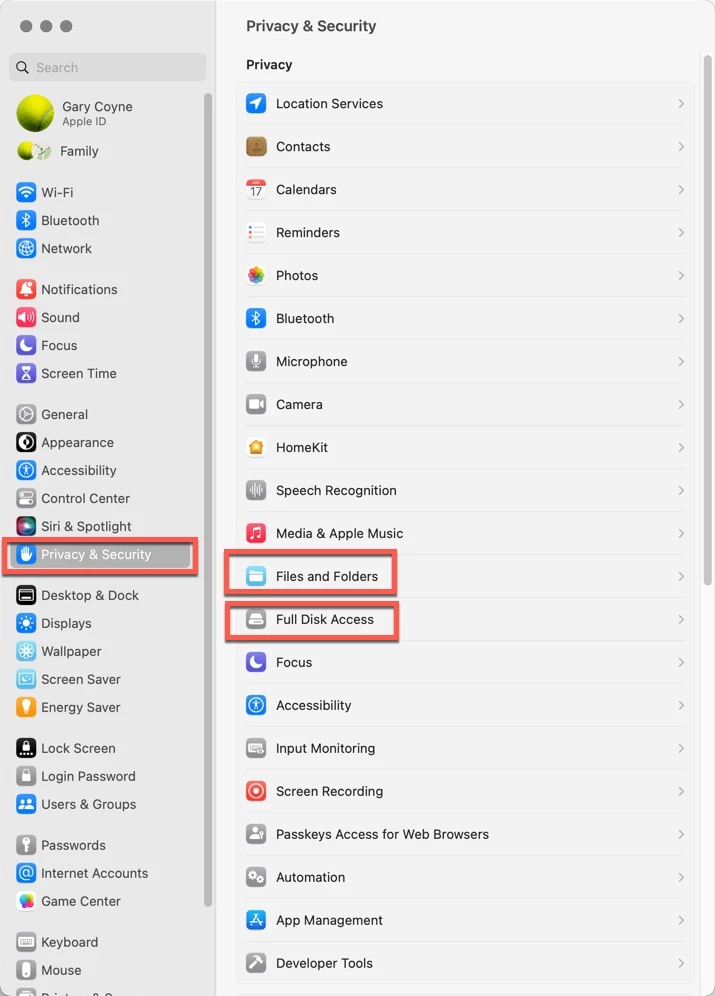
Go into the System Preferences and select the Privacy & Security tab on the left. Note that there are two options on the right you'll need to deal with: "Files and Folders," and "Full Disk Access."
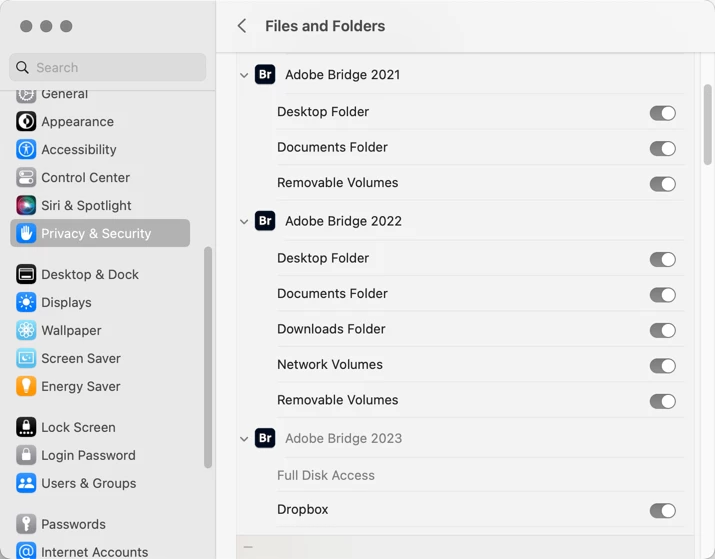
First, going into Files and Folders, note that in various years of different releases of Adobe Bridge, different needs are needed. I do not know why this is, but it's always better to check and make sure that just because you did it for one release, you may or may not need it for a subsequent release.
 

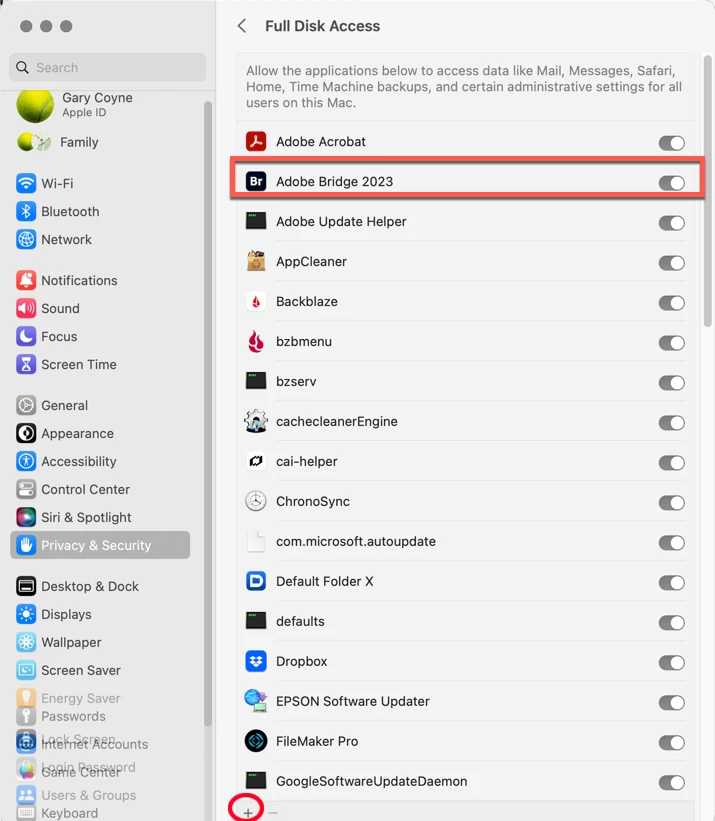
Lastly, go into the Full Disk Access option. If you do not see your application in the list, click on the "+" symbol at the very bottom of the window. This will bring up a standard Finder window. Navigate to your Applications Folder, find Adobe Bridge, and add it to the list (You will need to add your Administrator's password to do this.). Then you can "switch" it to the "ON" position. 
This should solve your problem.

Please let us know if that works or not.

 

3 replies

Participant
April 23, 2023

Vielen Dank, Ihre Unterstützung ist großartig.
Nachdem ich in den letzten Monaten mehrere Stunden lang versucht habe, das System zu implementieren, habe ich jetzt innerhalb weniger Minuten großartige Hilfe erhalten. Ich danke Ihnen sehr!

gary_sc
Community Expert
Community Expert
April 23, 2023

If you could please check my answer above as correct answer, that will help others with the same issue. Thanks!

Participant
April 23, 2023

Ja genau ich benutze Mac Version Mac OS Ventura

Version 13.3.1 

und habe die creativ cloude seit 2 Jahren

gary_sc
Community Expert
gary_scCommunity ExpertCorrect answer
Community Expert
April 23, 2023

OK, great, that's what I needed to know.

This sounds like you've not given Bridge permission for Apple's protection. Simply, this is an Apple protection issue, not Adobe's issue. The following was written for someone who needed (the same) help with Acrobat, just substitute Bridge and see if this solves the problem.


Go into the System Preferences and select the Privacy & Security tab on the left. Note that there are two options on the right you'll need to deal with: "Files and Folders," and "Full Disk Access."

First, going into Files and Folders, note that in various years of different releases of Adobe Bridge, different needs are needed. I do not know why this is, but it's always better to check and make sure that just because you did it for one release, you may or may not need it for a subsequent release.


Lastly, go into the Full Disk Access option. If you do not see your application in the list, click on the "+" symbol at the very bottom of the window. This will bring up a standard Finder window. Navigate to your Applications Folder, find Adobe Bridge, and add it to the list (You will need to add your Administrator's password to do this.). Then you can "switch" it to the "ON" position. 

This should solve your problem.

Please let us know if that works or not.

 

muratphoto
Participant
June 4, 2024

Thank you worked well here in June 2024


gary_sc
Community Expert
Community Expert
April 23, 2023

Hi, @dianastreit


Please let us know what your OS is and what release version you are using for that OS. For example, if you are using a Mac, is your OS: 13..3.1?