

Erik Bloodaxe
Legend
January 3, 2019
Question

Favorites Panel & Folder Paths Inconsistent Behaviour

  • January 3, 2019
  • 2 replies
  • 537 views

I have Bridge CC Version 9.0.2.219 x64 running on a Windows 10 PC.

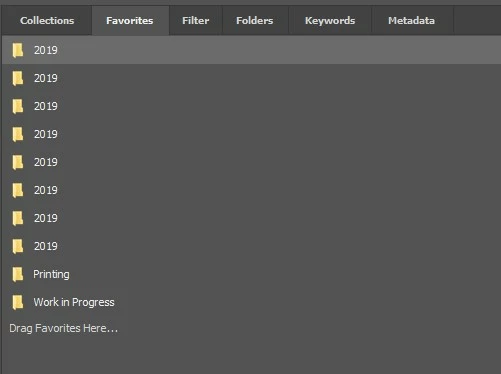
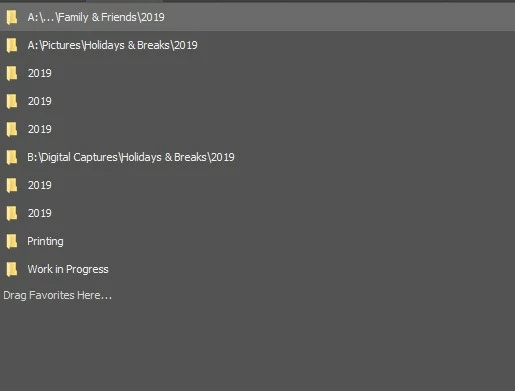
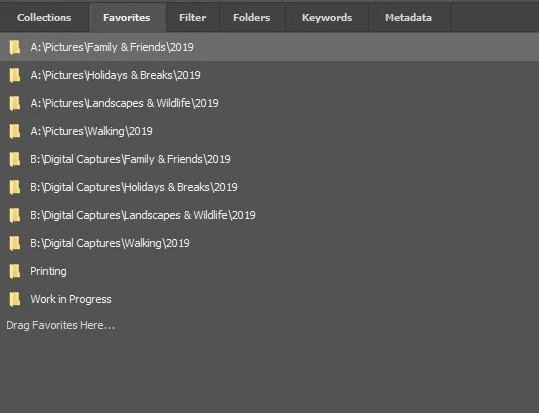
I have several folders in Favorites which all have the same name, namely 2019 for the current year, but they do not display consistently.

Sometimes no folder paths are shown:
Sometimes some folder paths are shown, some fully, some with ellipsis ... :
Sometimes all folder paths are shown in full:
If I close and reopen Bridge one of the above will occur but which one is quite unpredictable.

Can anybody explain what is happening here?

Is there a cure?

This topic has been closed for replies.

2 replies

Participating Frequently
January 7, 2019

Hi Peter,

Thanks for reporting this issue. We are tracking this at our end and will be working on it in future releases of Bridge.

Thanks,

Bridge Team

Stephen Marsh
Community Expert
Community Expert
January 4, 2019

As this is a user forum, I’d suggest that you report this issue at the feedback site so that it can hopefully be added to the long list of fixes for the CC2019 release:

https://feedback.photoshop.com/photoshop_family/categories/photoshop_family_bridge