
Participant
July 2, 2024
Answered

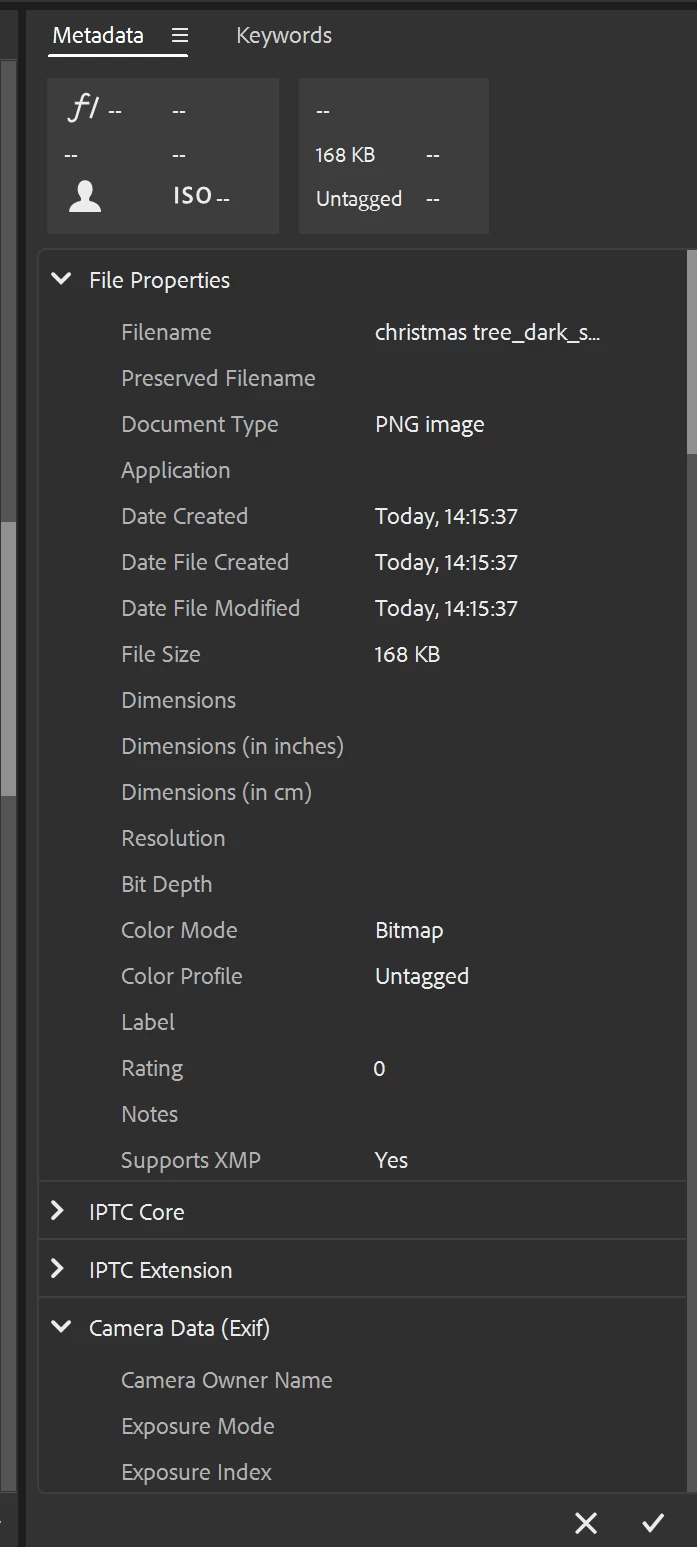
File Properties not showing correct data/missing data
  • July 2, 2024
  • 1 reply
  • 323 views

I have this PNG file exported from AI. It's a design with colours. I exported with ' Export > Export As'.  Why is the color mode in Bitmap and there is no dimension data?


A month ago with the same export method, I would have the metadata showing the colour mode sRGB with Dimensions (in inches) and Dimensions (in cm). 


Anything to do with the recent update? I am already on the updated version.  Please help.

This topic has been closed for replies.
Correct answer sprinklr-integration-user

Hey, Yinglara! Welcome to the Bridge Community. I need more details to help you understand this. 


What version of the operating system? Would you mind sharing the screenshot or video recording? 


Please check this discussion in which our Community Experts share solution that maybe related to your post. You can try steps mentioned in the article and let us know if this helps to fix your issue. 

https://adobe.ly/3zy5DzX


Thanks! 

Shivani 


1 reply

Legend
July 2, 2024

Does purging the cache for that file help?

Inspiring
July 10, 2024

Hey, Yinglara! Welcome to the Bridge Community. I need more details to help you understand this. 


What version of the operating system? Would you mind sharing the screenshot or video recording? 


Please check this discussion in which our Community Experts share solution that maybe related to your post. You can try steps mentioned in the article and let us know if this helps to fix your issue. 

https://adobe.ly/3zy5DzX


Thanks! 

Shivani 


YinglaraAuthor
Participant
July 10, 2024

Hi 


Thanks for the reply. I updated Camera Raw. The problem has been resolved. Don't know why. But thanks.