
debbiea683731
Participant
April 24, 2017
Answered

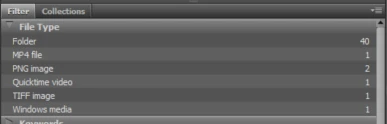
File Type jpg has disappeared from my Filter/File Type Window in Bridge and will not display jpg's in the file.

  • April 24, 2017
  • 1 reply
  • 326 views

JPG File Type has disappeared. Bridge will not show .jpg files in one particular images folder. (I can see the .jpgs in the folder when in windows explorer)

I've cleared all filters multiple times and still does not work.   Anyone know how to get it back?
    This topic has been closed for replies.
    Correct answer Stephen Marsh

    Try resetting the cache for that folder (Tools > Cache > Purge cache for…)

    Otherwise you may need to try global resetting:

    Re: Bridge CS3

    1 reply

    Stephen Marsh
    Community Expert
    Stephen MarshCommunity ExpertCorrect answer
    Community Expert
    April 25, 2017

    Try resetting the cache for that folder (Tools > Cache > Purge cache for…)

    Otherwise you may need to try global resetting:

    Re: Bridge CS3
