
Participant
September 21, 2020
Answered

Filename string substitution: rename and reorder elements using RegEx

  • September 21, 2020
  • 3 replies
  • 860 views

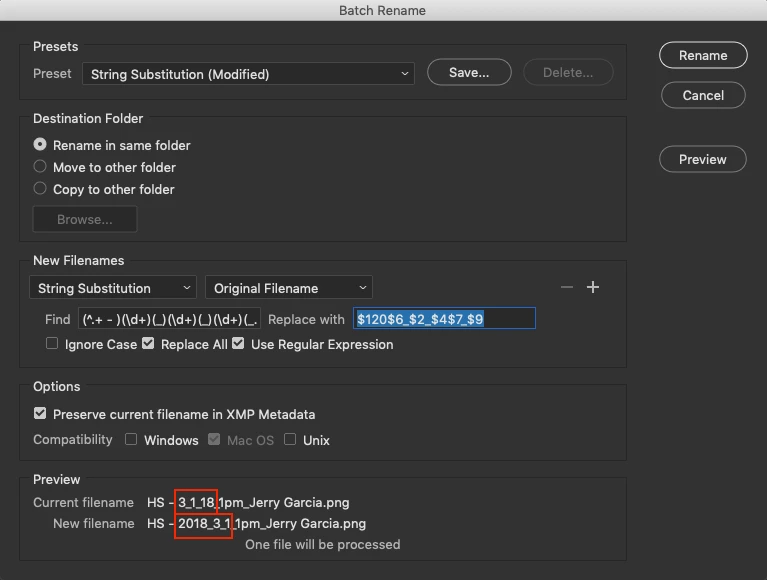
I am trying to understand the RegEx syntax to accomplish a limited scope of rename/reorder operations for migration to a new MAM/storage system. I have thousands of files with file names resembling the following:

HS - 3_1_18_1pm_Jerry Garcia

and need to identify and reorder the date/time string from the existing M_DD_YY_Ttt format seen above to the new format of:

YYYY_MM_DD

and then possibly rearrange the different elements of the filename.


I have used Bridge extensively in the past for basic find/replace and sequencing jobs, but I have been unable to find a good primer on the RegEx syntax for advanced string substitution. Please advise.
This topic has been closed for replies.
Correct answer Stephen Marsh

Presuming that the year should be changed from 18 to 2018, one method would be to use Bridge's Batch Rename as follows:


Find:

(^.+ - )(\d+)(_)(\d+)(_)(\d+)(_.+)(_)(.+)


Replace:

$120$6_$2_$4$7_$9


Of course, it will not be that easy, as you probably also wish to pad out single D and M values to be DD and MM as well as the presumed 20 padding before the year to make YY into YYYY.

3 replies

Stephen Marsh
Community Expert
Stephen MarshCommunity ExpertCorrect answer
Community Expert
September 22, 2020

Presuming that the year should be changed from 18 to 2018, one method would be to use Bridge's Batch Rename as follows:


Find:

(^.+ - )(\d+)(_)(\d+)(_)(\d+)(_.+)(_)(.+)


Replace:

$120$6_$2_$4$7_$9


Of course, it will not be that easy, as you probably also wish to pad out single D and M values to be DD and MM as well as the presumed 20 padding before the year to make YY into YYYY.

Participant
September 28, 2020

Thanks you @Stephen Marsh , that helps me greatly! I have also found RegEx Coach in the interim of these posts.

Stephen Marsh
Community Expert
Community Expert
September 21, 2020

Please provide at least three full before and after examples including 1 and 2 digit date examples.

Legend
September 21, 2020

I'm not sure a regex is the way to go. Writing a script might work better since you are trying to parse the filename.