
joziG
Known Participant
October 21, 2022
Answered

Files suddenly NOT found in Bridge 2023

  • October 21, 2022
  • 2 replies
  • 994 views

Hi

Bridge 2023 is bringing with it an "intriguing" and vastly annoying new occurrence.


When I am trying to open an image by the usual means, the file cannot be found!???
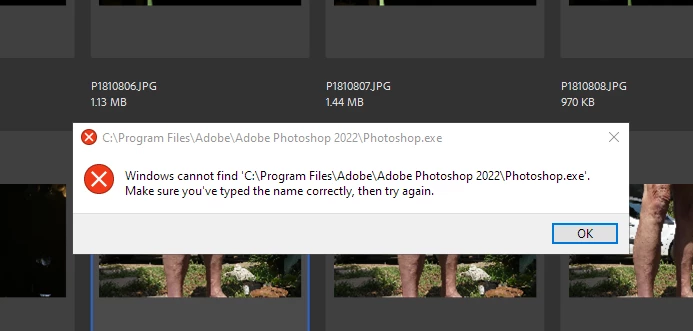
 

I have changed absolutely nothing. Never ever had that problem in any of the older versions of Bridge.

All I can do at the moment is yell: HELP please

This topic has been closed for replies.
Correct answer Shubham V

Hi @joziG ,
Thankyou for providing the required information.
Can you please try and set Photoshop 2023 in File Type Associations for JPEG. 
Steps :
1. Go to Bridge application.
2. Preferences > File Type Associations
3. JPEG. set Photoshop 2023 as application to use when accessing JPEG files. 

If photoshop 2023 is not listed you can choose browse then navigate to the photoshop installed folder and select photoshop.exe. This will resolve your problem.

If you still facing the same problem, please let me know.

Thanks,
Bridge Team

2 replies

Adobe Employee
November 1, 2022

Hi @joziG ,
Thanks for your feedback.
Could you share the following details about the issue:

  • Bridge version
  • System configuration
  • Photoshop version installed on your machine
    • If photoshop 2022 is installed please share the file "AdobeBridgeOpenerPreferences.xml" at location C:\Users\abc\AppData\Roaming\Adobe\Bridge 2023 on  sharewithbr@adobe.com.
    • If photoshop 2023 is installed, please check in Bridge appplication:  Preferences > File Type Associations which application is associated with JPEG


Thanks,
Bridge Team

joziG
joziGAuthor
Known Participant
November 1, 2022

Thank you for coming back to me.


Bridge 13.0.0.562

Photoshop  2023

Windows 10 Pro 64-bit

Version 21H2

OS Build 19044.2130

8 GB  RAM  (Wish my PC would allow upgrading)

JPG association in Bridge   Explore settings


I suppose, the last may be the crux of the matter?

Thank you

Looking forward to be hearing from you.

Shubham VCorrect answer
Adobe Employee
November 1, 2022

Hi @joziG ,
Thankyou for providing the required information.
Can you please try and set Photoshop 2023 in File Type Associations for JPEG. 
Steps :
1. Go to Bridge application.
2. Preferences > File Type Associations
3. JPEG. set Photoshop 2023 as application to use when accessing JPEG files. 

If photoshop 2023 is not listed you can choose browse then navigate to the photoshop installed folder and select photoshop.exe. This will resolve your problem.

If you still facing the same problem, please let me know.

Thanks,
Bridge Team

Known Participant
October 22, 2022

If you are using Windows I suspect that your problem is the same as mine. Windows does not accept Adobe Bridge, or Adobe Photoshop as Apps and therefore they are not listed, which apparently means that in Windows 'mind' they do not exist. I have been trying for 3 days to get this sorted and so far zilch!

joziG
joziGAuthor
Known Participant
October 23, 2022

Hi, yes I am on Windows 10. 

However, as far as I can see, Adobe Bridge and Adobe Photoshop are recognised as apps! They are definitely listed as apps. So, whereto from here?


The images show up in Bridge, when I try to enlarge them, I get the above message.

There must be something in the Bridge setup that makes it look in the wrong places


Anyone