
Inspiring
March 15, 2017
Answered

Filter images by hours?

  • March 15, 2017
  • 2 replies
  • 443 views

From what I can tell, filtering images by date shot is the only way of filtering images time wise. But I need to sort images shot between 4 pm and 07 am (for a time lapse over a longer time span). Is that possible somehow?

This topic has been closed for replies.
Correct answer Stephen Marsh

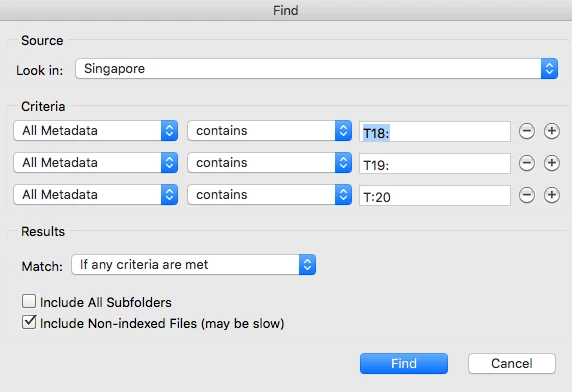
You can use the Find command to do a similar thing as a filter:

How do I select my pics by TIME taken ?

2 replies

Inspiring
May 31, 2017

Hi again,

I was about to do the time search in my images now, but can´t find the meta data search field! There are quite a few searchable things one can choose from, but not metadata. Where the heck do I find that??

Stephen Marsh
Community Expert
Community Expert
May 31, 2017

You will need to use the “all metadata” option, then type in an appropriate search term. You can work out the appropriate metada search term by looking in File > File Info > Raw Data to see what the time format entry looks like.

For example:

<xmp:ModifyDate>2016-06-29T10:20:36+10:00</xmp:ModifyDate>

<xmp:CreateDate>2016-06-19T18:32:35.89+10:00</xmp:CreateDate>

Stephen Marsh
Community Expert
Stephen MarshCommunity ExpertCorrect answer
Community Expert
March 15, 2017

You can use the Find command to do a similar thing as a filter:

How do I select my pics by TIME taken ?

Inspiring
March 15, 2017

That should work! Great! Thanks!