doggypower01
Participant
April 6, 2021
Answered

Find only images that have RAW settings applied

  • April 6, 2021
  • 2 replies
  • 373 views

Is there a way in Bridge to filter or search for just the files that have been modified in Camera Raw? I'd even take a way to filter where Creation Date does not equal Modified Date.


Thanks!

This topic has been closed for replies.
Correct answer Stephen Marsh

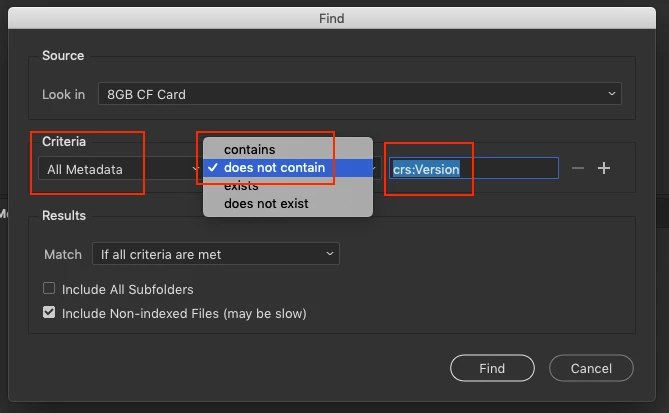
You could also use the find command similar to this screenshot (looking into the metadata for crs: related info):
 

2 replies

Stephen Marsh
Community Expert
Stephen MarshCommunity ExpertCorrect answer
Community Expert
April 7, 2021

You could also use the find command similar to this screenshot (looking into the metadata for crs: related info):


doggypower01
Participant
April 7, 2021

Thanks, Steven. I couldn't use the filter because "Custom Settings" was not an option for me.


However, I tried the second method, and by selecting All Metadata contains crs:Version, I got what I was looking for.


That said, how did you know to use the specific text "crs:Version"? Is there documentation about this somewhere?


Thanks again,


Chris

Stephen Marsh
Community Expert
Community Expert
April 8, 2021

I can't think of any documentation off-hand, however I'm "sorta into metadata" so I have taught myself along the way with Adobe products, scripting and ExifTool.


If you get File Info on a file that has been processed via ACR and a "clean" file that hasn't, you will see the differences in the meatadata listed under Raw Data. The caveat being that you can't use the < or > symbols in the find.


Edit: I think that any crs: metadata would do the job, however I recently I stumbled over crs:AlreadyApplied in an Adobe script.

Stephen Marsh
Community Expert
Community Expert
April 7, 2021

Filter Panel, Camera Raw:


No Settings

vs.

Custom Settings