Participating Frequently
February 25, 2018
Answered

Finding which folder a known file name is in.

  • February 25, 2018
  • 1 reply
  • 443 views

I searched for a photo that I know the name of in Bridge search. I have found the image but what I would like to know is how do I find which folder that it is stored in? My folders are organized as such, they are under my hard drive letter C: then a pictures folder then most of them are within dated folders (eg.2017Aug13) When I found this photo it showed that it was in my pictures folder but does not show the dated folder. Im trying to find which dated folder its in. Thanks


    This topic has been closed for replies.
    Correct answer Stephen Marsh

    There may be better ways, however my first thought is to show the path bar:

    Then perform your search…

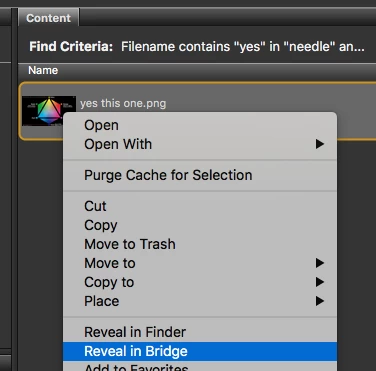
    Finally, contextual click on the image and select the “Reveal in Bridge” (or Reveal in Finder/Explorer) command:

    Which will show the path:

    Another option could be a custom Inspector Panel script…

    1 reply

    Stephen Marsh
    Community Expert
    Stephen MarshCommunity ExpertCorrect answer
    Community Expert
    February 26, 2018

    There may be better ways, however my first thought is to show the path bar:

    Then perform your search…

    Finally, contextual click on the image and select the “Reveal in Bridge” (or Reveal in Finder/Explorer) command:

    Which will show the path:

    Another option could be a custom Inspector Panel script…

    lukea13Author
    Participating Frequently
    February 26, 2018

    Yes! Got it. Thank you very much, very helpful.