
Participant
November 7, 2023
Question

fix adobe bridge 2024 windows menu

  • November 7, 2023
  • 1 reply
  • 359 views

hi there,

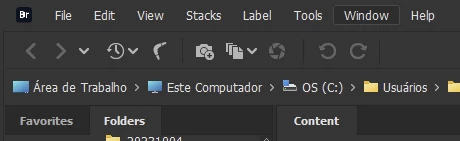
do you guys know how I could customize the adobe bridge 2024 windows menu to look like adobe bridge 2022? I just upgrade to 2024 and the light gray color is very distracting.


adobe bridge 2022:


adobe bridge 2024:
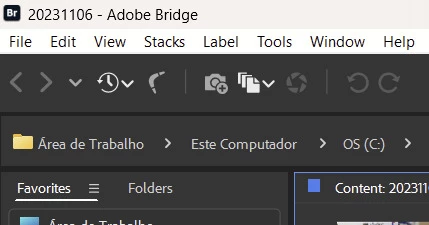


it is ugly and distracting.

thanks


This topic has been closed for replies.

1 reply

gary_sc
Community Expert
Community Expert
November 7, 2023

Hi, @thales27802416hd13, unfortunately, the only options are the three we are presented with. You can change the shade of area behind any images (both Preview and Content Panels), but that's it. 


While I do not like the dark options, I am further back than you because the only option I have is the one "light" option. 


Suffice it to say, you have my sympathy. 


Hopefully, one of these days, the Bridge team will be able to go back and revisit the background and set things right again for both dark AND light backgrounds.

Participant
November 8, 2023

Thanks Gary. But, how come it is not possible to change it? That upper bar takes a lot of screen real state AND it is ugly.

Besides that, I did not see any performance improvement in Adobe Bridge 2024 over the older version.

I will just go back to adobe bridge 2022.


Participating Frequently
August 19, 2024

Hi! I have the same problem as you, it's so frustrating. Have you found a solution in the meantime?