

Known Participant
June 24, 2020
Question

Help! /dev on Macintosh HD is crashing Bridge

  • June 24, 2020
  • 1 reply
  • 1304 views

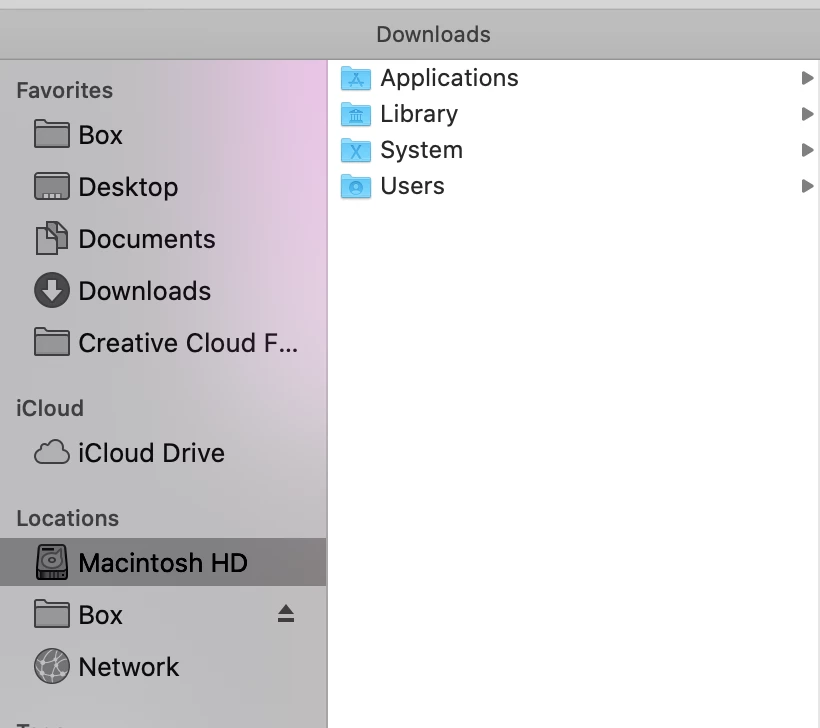
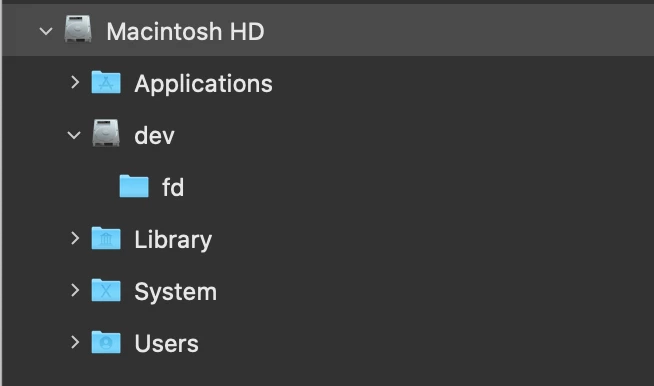
The new Bridge is displaying /dev under the Macintosh HD and it is causing Bridge to hang. Please add a fix so that Bridge does not see this drive. Finder doesn't show it.
 

This topic has been closed for replies.

1 reply

gary_sc
Community Expert
Community Expert
June 24, 2020

Hi Mikie, LI


Gotta tell ya, I've never looked but I also see the /Dev drive when looking at the Hard Drive folder. No clue about what that is beyond the fact that I do not creash or freeze or anything bad when see it or examing it. I have a hunch that something else in your system is though.


Please do two things:


1) rebuild your Bridge's Prefs:

When launching Bridge, Command-Option (Mac)/Control-Alt (Win) + Shift to choose “Reset Preferences”, Purge Entire Thumbnail Cache”, and/or Reset Standard Workspaces”.


#2) Dump all of your local caches:

Go to Tools (menu): -> Cache -> Manage Cache. 

Then select Purge all local Caches


Let us know how this works. Thanks!

Known Participant
June 24, 2020

I did try that as well before I posted here. And during that process Bridge also got stuck and stopped responding. So I had to force quit. My version looks a little different than yours since I am on the newest version.

Known Participant
June 24, 2020

So I will continue to monitor the behavior, but since trying to manage cache after Bridge already started and it didn't work, I went ahead and help the Option key while starting it back up and went ahead and cleared everything through this window.
