

Infinite Impressions
Participant
September 12, 2019
Answered

Hidden images in bridge

  • September 12, 2019
  • 4 replies
  • 11770 views

Where would I go to view the “hidden images” - I use bridge to do all camera raw adjustments before taking to photoshop. I use a card reader & do not download all images on card to bridge. I view from my card but it seems to be hiding images more frequently. How can I access these or resolve them from going in hiding? 🙂 
    This topic has been closed for replies.
    Correct answer Chuck Uebele

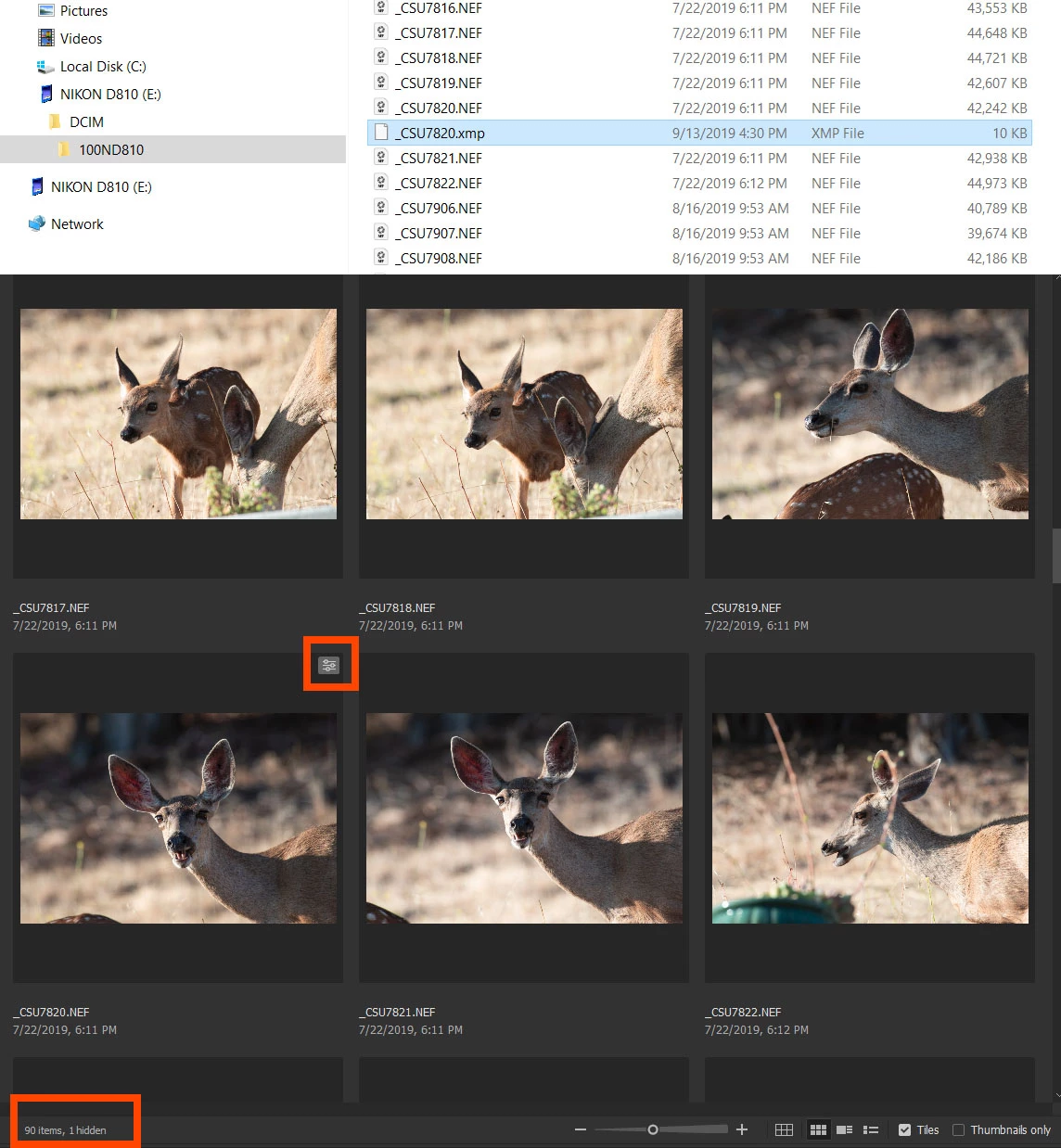
    Here is a screen shot of Bridge and Microsoft's file explorer. This is images that I have on a camera card. There are 90 images, and one XMP file of an image that I made corrections on. You can tell that it as been edited in Bridge due to the edit icon in the upper right of the thumbnail. Bridge shows 1 hidden file - the one that I edited.


    4 replies

    Chuck Uebele
    Community Expert
    Chuck UebeleCommunity ExpertCorrect answer
    Community Expert
    September 13, 2019

    Here is a screen shot of Bridge and Microsoft's file explorer. This is images that I have on a camera card. There are 90 images, and one XMP file of an image that I made corrections on. You can tell that it as been edited in Bridge due to the edit icon in the upper right of the thumbnail. Bridge shows 1 hidden file - the one that I edited.


    Infinite Impressions
    Participant
    September 14, 2019

    You are incredible! Answered all questions crystal clear! Thank you SO much!

    i guess I was mainly wanting to know 100% it was not storing ANYTHING “hidden” that I had no access to! But this is the answer. Thank you! (It’s mt first year in this journey) 📸

    Chuck Uebele
    Community Expert
    Community Expert
    September 13, 2019

    Okay, now it makes sense. If you are viewing and correcting your photos on your camera card, it produces the XMP sidecar file that contains the developing info for your image. Bridge doesn't display them, as there is nothing to display. If you look in a file browser, you will see the xmp files with the same name as your raw files, but with the .xmp extension.

    Infinite Impressions
    Participant
    September 13, 2019
    Okay. I sound silly. It only changes random images to .xmp files & this is the silly part. Where exactly do I search and can I access from bridge to find those xmp files?
    Chuck Uebele
    Community Expert
    Community Expert
    September 13, 2019
    The XMP files are only created if you edit a photo in Camera Raw. There is no need to access them. If you transfer your images to another drive - not though Bridge - you would need to copy the xmp files also, or you will loose your edits. If you delete an xmp file, it will revert your image to it's original capture. You really don't want to access those files through Bridge, as they just contain editing infomation.
    Chuck Uebele
    Community Expert
    Community Expert
    September 13, 2019

    I'm confused by your use of hidden also. So I'm not sure if that mean delete, corrupted, or actually hiddened.

    Infinite Impressions
    Participant
    September 13, 2019

     Bottom left in bridge. 

    Chuck Uebele
    Community Expert
    Community Expert
    September 13, 2019

    You don't really download to Bridge. Bridge is just a type of image browser. You download them to your hard drive, which you should do, as camera cards can easily become corupted.

    Infinite Impressions
    Participant
    September 13, 2019
    Is there anyway to retrieve the “hidden” or does that mean they’re ‘deleted’ in reality? I’m confused with the hidden images and if I am able to retrieve them. Thank you so much!