Participant
August 29, 2018
Answered

History Missing

  • August 29, 2018
  • 1 reply
  • 5321 views

Greetings.

I have a Mac High Sierra and am working in Bridge in Filmstrip mode. Five days ago History went missing from my Bridge CC  Window and the History tab is missing from the right panel.  As a matter of fact there is no right panel at all. Online standard response to this is to click on Window and select History from the menu or, failing that, click on the History tab.  Neither works for me. "History" remains conspicuously and frustratingly absent from both. In addition and in the process of trying to understand what the problem is and how to solve I've managed to loose my settings and workspace several times. This is driving me crazy. I'm lost and would be most grateful for any suggestions.

Thanks ahead of time.

Jpkln

    This topic has been closed for replies.
    Correct answer jeffreyp82067912

    Hi Jeff,

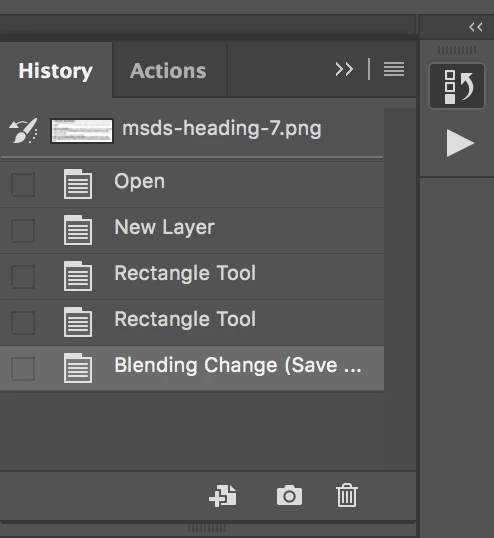
    Correct: the History panel does NOT exist in Adobe Bridge. It DOES however, exist in Adobe Photoshop. Which makes me think you might be confusing the feature with what the History panel does in Photoshop.

    To show the History panel:

    • Choose Window > History.

    The History panel, most likely will appear docked to the right of your computer screen:

    To learn more about using the History panel see:


    Hi Cari.

    .

    I reread your observation that I might be confusing my issue with what the History Panel does in Photoshop.

    You’re right. I began to notice how Photoshop hovers in the background behind Filmstrip (like a layer) and it dawned on me I needed to rethink the whole situation. Your comment turned my understanding completely around, freeing me up to finally resolve my issue. Thank you Cari.

    All the best.

    Jeff

    1 reply

    Legend
    August 31, 2018

    History tab in Adobe Bridge? Are you referring to 'Edit History' in the Metadata panel?

    Participant
    September 2, 2018

    Hi Cari. Thanks for getting back so soon. Sorry for the delay.

    Yes. I believe it may be the Metadata Panel and it has to do with do/redo and edit. Elsewhere online it’s referred to as “History tab” or “HistoryPanel” and should be present in the window menu. It’s also, I noticed, indirectly associated with "Reset Essentials". I’ve taken my Mac High Sierra to three different computer service stores and they all agree that the History panel does not exist on my Bridge CC. Interestingly this History tab does appear in the Photoshop CC workspace. Hope you can help. I’m wondering if I should uninstall and reinstall Photoshop —which I would dread as I’ve heard so many horror stories.

    Sorry. I wish I were a lot more helpful and computer savvy.

    Jeff

    Legend
    September 2, 2018

    Hi Jeff,

    Correct: the History panel does NOT exist in Adobe Bridge. It DOES however, exist in Adobe Photoshop. Which makes me think you might be confusing the feature with what the History panel does in Photoshop.

    To show the History panel:

    • Choose Window > History.

    The History panel, most likely will appear docked to the right of your computer screen:

    To learn more about using the History panel see: